Operating Systems for Games Platforms
Intro
When talking about software it is impossible to miss that of Operating Systems. These are by far the most important and complex pieces of software which are responsible for your ability to run games and game development software. So with that in mind let's begin.
What is an Operating System
Now before we continue with the finer details of an operating system it is probably best if I first answer the forefront and prominent question which is "What is an operating system?"
An operating system is single-handedly one of the most important pieces of software which your computer or console will contain. An operating system is simply a software management system which interfaces and deals with the base layer of a computer. It is responsible for actually allowing the various sections of your hardware to interact with each other and allows you the user to interact with them. It also allows the user to develop or use applications upon the system. An operating system can be thought of as the brain of a computer, sending and accepting information to and fro from section to section all whilst making use of it's hardware such as memory and CPU's. Simply put, without you the user would not be able to use your computer without it.
Along with allowing access to hardware and hardware to access each other it also provides an environment for a user to execute single or multiple commands or execute applications all within an interface which is kinder to the user than what the computer actually reads and performs. Now with that out of the way, it is time to explain the various areas and examples of an operating system in more detail. First I will be explain the still relatively new advent of GUI's and their place within an OS. Then I will discuss the 4 different types of operating system available to consumers. Finally i will give examples of popular operating systems within different hardware's.
GUI's
Operating systems were not always the fancy looking and interactive items which they are today. When they first began and indeed throughout most of their infancy visual input was either non-existent or if present it was merely text displayed upon a screen which allowed the user to sift through directories and applications which could have data inputted but, and i stress again there was no interface. Popular proponents and uses of this type of operating system were purely due to technological limitations of the time. Below are a couple of picture examples demonstrating early non GUI based operating systems.
 |
| (Ex.1 - DOS (Disk Operating System) circa 1985) |
 |
| (Ex. 2 - Arch Linux 2009) |
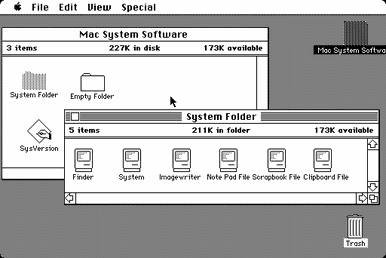
Enter then the GUI or Graphical User Interface as it is more commonly known. GUI's were at the period of the 70's an extremely new concept and many companies were to trying to manufacture concepts and ideas on how to develop an efficient and user friendly GUI system with the given hardware of the time. There were many attempts all of which have set the rules and methods which are in many cases still carried through in even modern GUI developments. But, a major breakthrough was that of the Macintosh and the Apple Lisa released in 1984 by Apple Inc. This OS set a new standard and ability for GUI based systems along with new core concepts such as preemptive multitasking and Graphical oriented process communication it also featured a stable set of accessories such as clocks, calculators and notepads.
 |
| (Ex. 3 - Macintosh OS 1984 showing the various GUI based functionality of the system such as windows and icons.) |
Although many other companies had developed parts this was one of the original OS's to put together these ideas and create a stable, graphical working environment. After the success of the Apple Lisa (and later the Apple IIgs.) Many other GUI developments were being made such as overlapping windows, resizing options and even graphical effects. The thing that helped boost these developments was the arrival of the Windows 3.X line of operating systems with it's own uniquely developed GUI system created by Microsoft. With these two companies in competition many developments and strives were made leading to the modern day GUI systems which are using in mobile devices, tablets, PC's, laptops, consoles etc. So simply put, GUI's are the windows, icons, pointers and other various graphical representations you see upon your screen. The browser which you are using at this very second is a GUI so is the task-bar or docky of your OS or even the battery icons on your phone these are all GUI's.
Types of Operating Systems
Now that we have discussed the GUI advancements and what operating systems are it is time then for us to move onto the various types of operating systems available to users.
RTOS (Real Time Operating System)
Real-Time Operating Systems or RTOS's are real-time run operating systems designed for use with machinery, scientific instruments, mining process's and other automated machinery. There are pre-programmed to follow the exact same order of functions over and over whilst managing the various sub-systems being used. These often have little to no external functionality other than for debugging and repairing purposes. Due to their nature they are often not used and seldom seen within the commercial sector as they are more custom developed and tailored to a specific hardware's function or needs.
Single User, Single Task
Single User, Single Task operating systems were used heavily with mobile devices throughout the 90's and early 2000's as well as being featured within computer operating systems in the 70's. A Single User, Single Task operating system is a fairly self-explanatory OS. It is simply an OS which is capable of handling one user and running only one requested application at any one instance. For example a popular SUST OS would be that of MP3 players. These devices allow users to be able to navigate it's contextual menu's and GUI's but only allows the playback of one song at any one time. Of course more modern ones are capable of advanced browsing and such now, but, early models were perfect examples of this type. Other examples include PDA's which allowed the user to write spreadsheets or documents, early mobile phones which allowed the user to access SMS messaging and games, Very early tablet devices etc.
Single User, Multitask
Now, after SUST OS's come SUMT OS's or Single User, Multitask OS's. Now these types of operating system are now extremely popular and most major devices run them. The likely chance is that right now you are using one to read this very blog. A SUMT OS is capable of allowing the user to navigate various directories, listen to music, watch a video, write a document and message friends simultaneously. This is the exact function of SUMT OS to provide the user with multi tasking capabilities. Popular examples include: PC operating systems, modern smartphone devices, modern tablet devices etc. These all make use of SUMT OS's.
Multi-User
Multi-User Operating Systems or MUOS's are operating systems which are capable of handling hundreds of multiple users at any one time, allowing them to access various shared documents and programs simultaneously. These are often referred to as networks, servers and shared drives. They have a heavy use within the games industry when it comes to hosting games servers for multiple players to connect and play on as well as being used heavily within education and office sectors to help enable files being tagged or pinned to a user so that regardless of which computer is used their preferential settings and files are all kept to their login. This makes it easier for business's to communicate and share work with other staff members thus enabling better and faster workflow's. Popular devices which make use of this type of OS would be platforms such as Servers, Render Farms, Network Drives etc.
Console Operating Systems
So, for modern consoles to run and read data from discs or digital binaries they require the use of an OS to function. This OS is also used to help allocate memory and API's for games to access and use. Although not used in the traditional PC sense of an operating system console's make heavy use of tailor made OS's to run their console architecture's below are some common and popular console OS's.
PS4 - The PlayStation 4 developed by Sony Interactive makes use of a UNIX based OS architecture which is taken from open source code. It's unique OS is known as Orbis which is based upon a popular free Linux variant known as FreeBSD. It's architecture its extremely similar to that of UNIX based systems and it has added many new and unique design features to the architecture. Below are some screenshots.
Xbox One - The Xbox One uses a custom built form of OS which runs within a HyperVisor. This allows the console to have to functional operating systems which deal with different tasks and interact with each other. Their is the console's main OS which deals with game and store searching functionalty as well as parties and friends lists. Then it has incorporated a stripped down version of Windows 8, 8.1 and soon Windows 10. These are responsible for the various applications and design interface of the console OS. Below are some screenshots.
Computer Operating Systems
Now that we have explored some of the more unique console OS's it is time now to switch back to the more comfortable realm of desktop OS's. A desktop OS is any operating system which runs on either a laptop, notebook or desktop based system. There are 3 popular variants and 2 popular architectures which they are based upon. Within this area i will be discussing the various popular types.
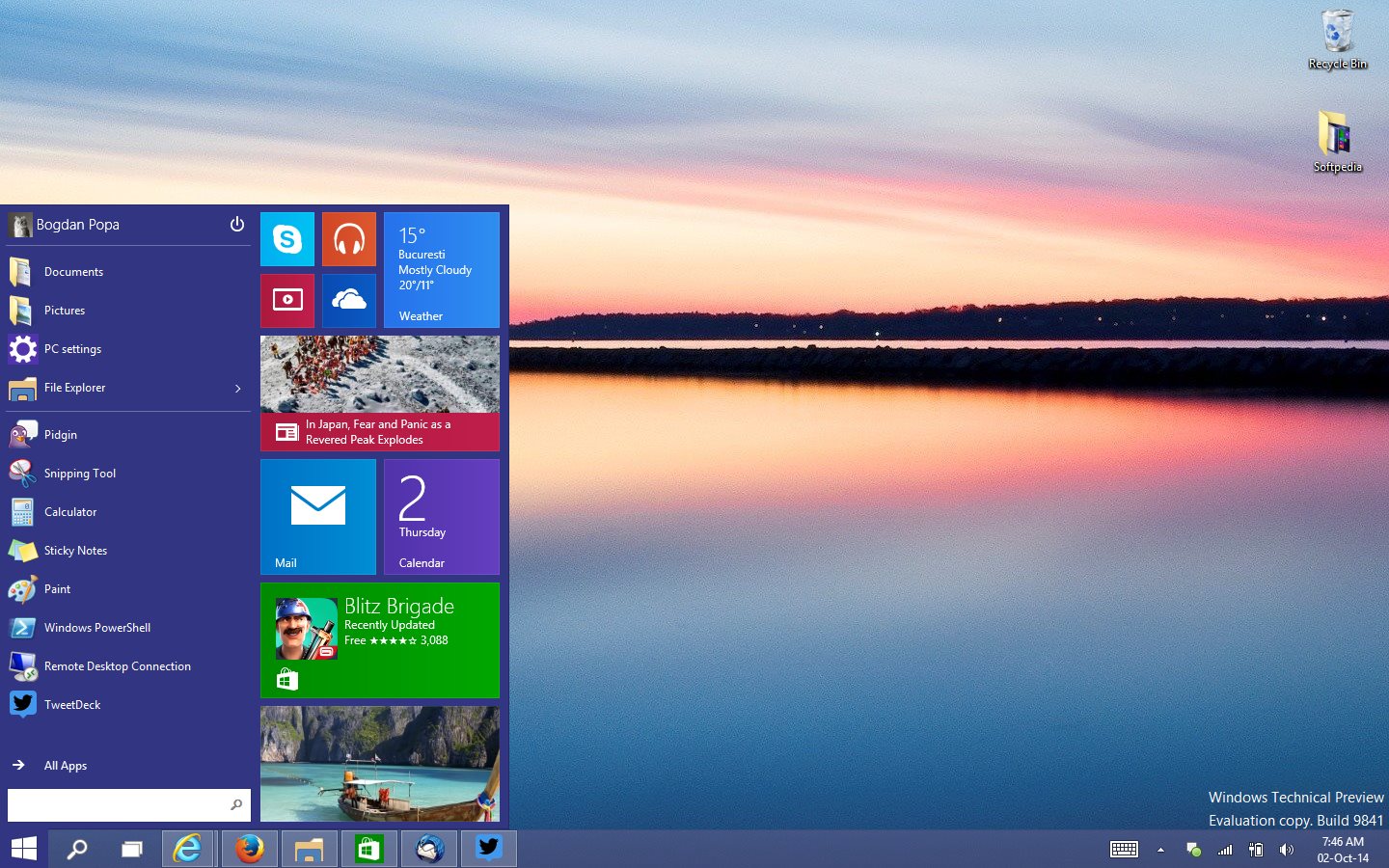
Windows - Windows along with Macintosh is the most popular OS around the world with many application developers, games developers, military institutions and government center's all making use of the OS. Originally based upon the DOS kernel Windows has since grown into an advanced and slick MUOS, SUMTOS. It is often considered more popular amongst gaming crowds due to a successful jump in the early 90's which unfortunately left Macintosh as a stigmatized OS for games. It has become popular for it's unique task bar and start button GUI interface which allows users to pin and use apps. It has also seen some newer changes with the introduction of the metro UI which has me both acclaim and critic from many people. Below are some screenshots.
 |
| Windows XP |
 |
| Windows Vista |
 |
| Windows 8 Start Screen |
 |
| Windows 10 Development Build |
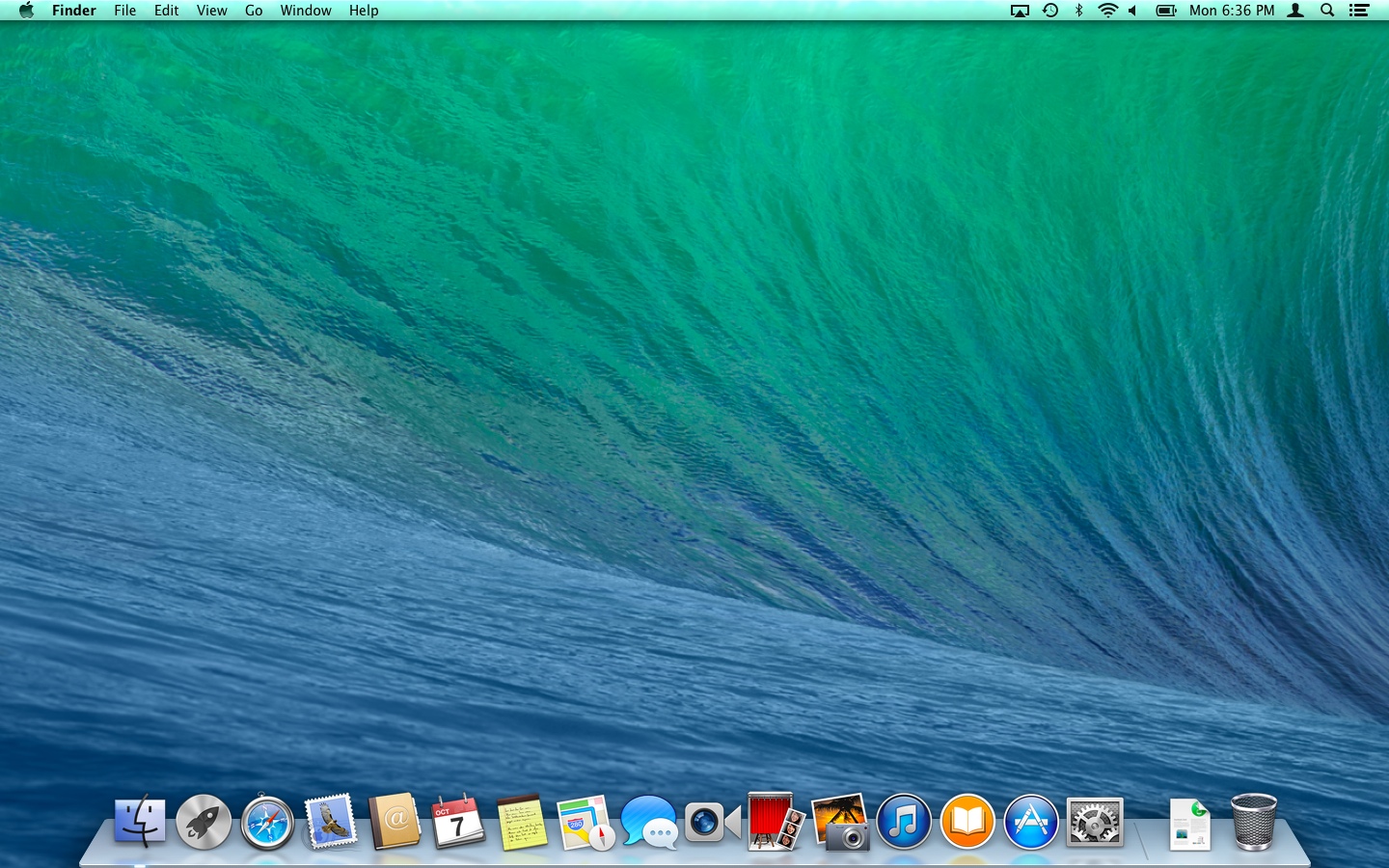
Macintosh - Macintosh developed by Apple Inc. Is another extremely popular OS which has seen use within many of the important media industries such as media, films, music and games. The OS's ease of use and slick GUI style with the use of a docky for users to pin applications to it attracts many crowds who are looking for an operating system with less technical focus and more entertainment. It has become renowned for it's minimalistic modern art design and 2 toned color schemed GUI style. It has a high fan base amongst artists and other media groups but due to a minor hiccup in the early 90's it has lost it's fervor amongst the gaming masses. Below are some screenshots.
 |
| Mac OSX Tiger |
 |
| Mac OSX Snow Leopard |
 |
| Mac OSX Mavericks |
 |
| Mac OSX Yosemite |
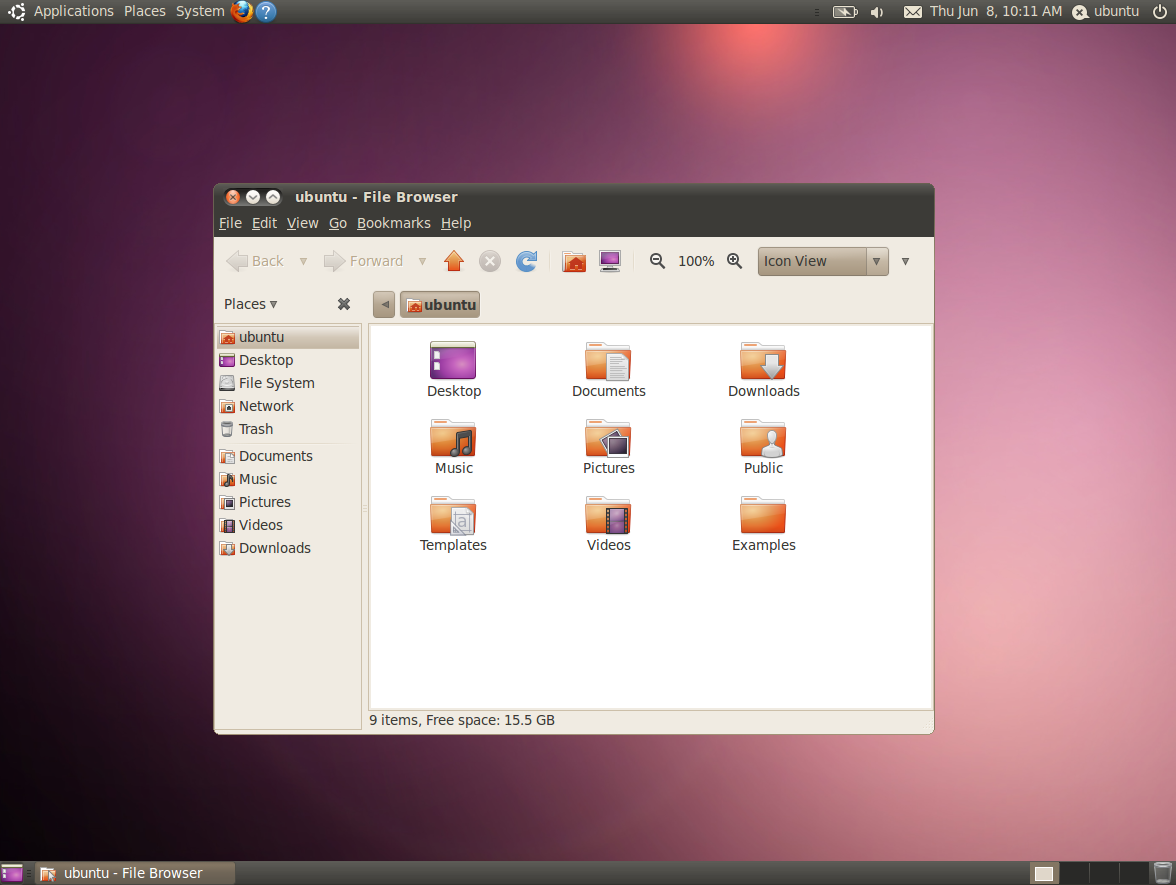
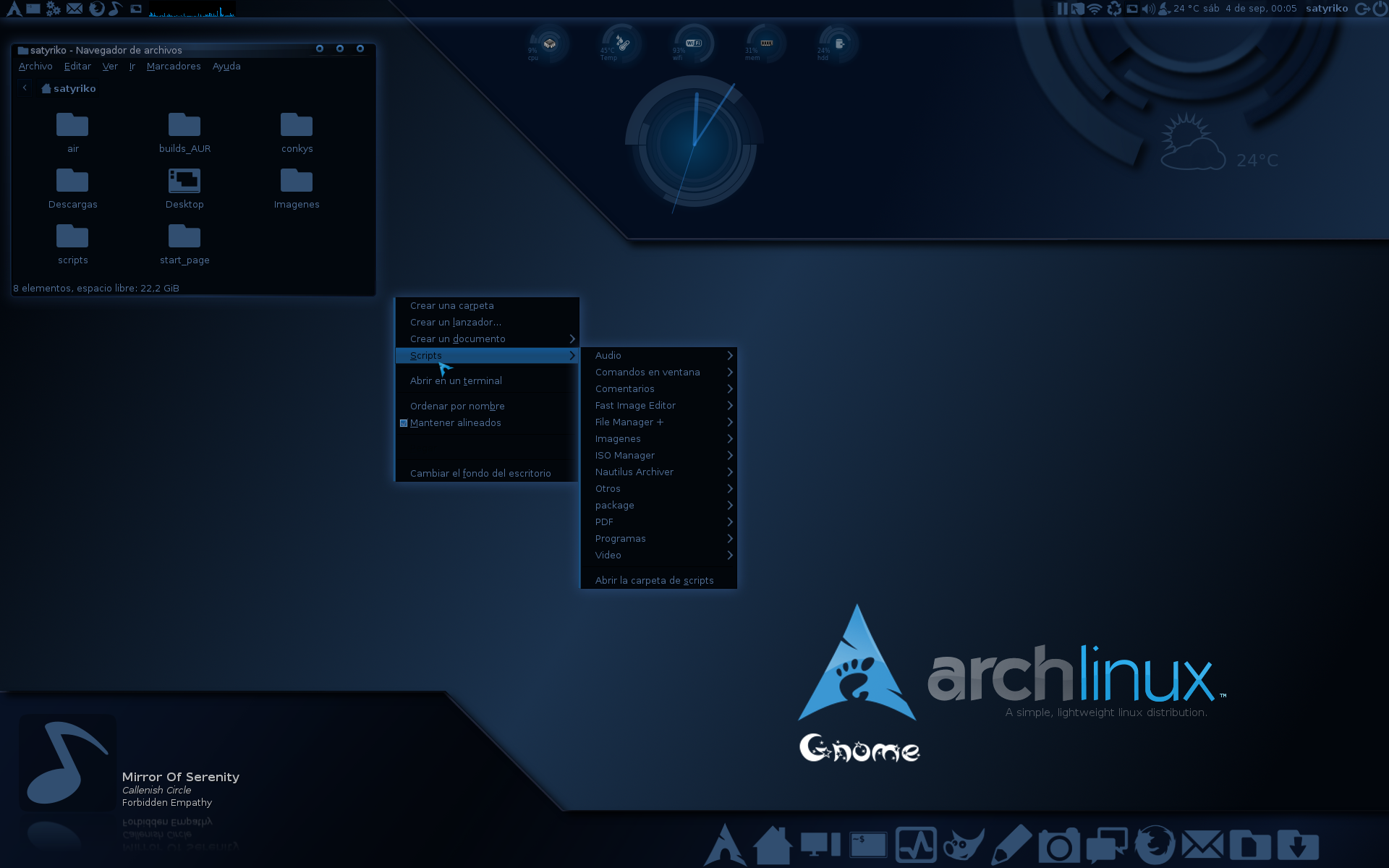
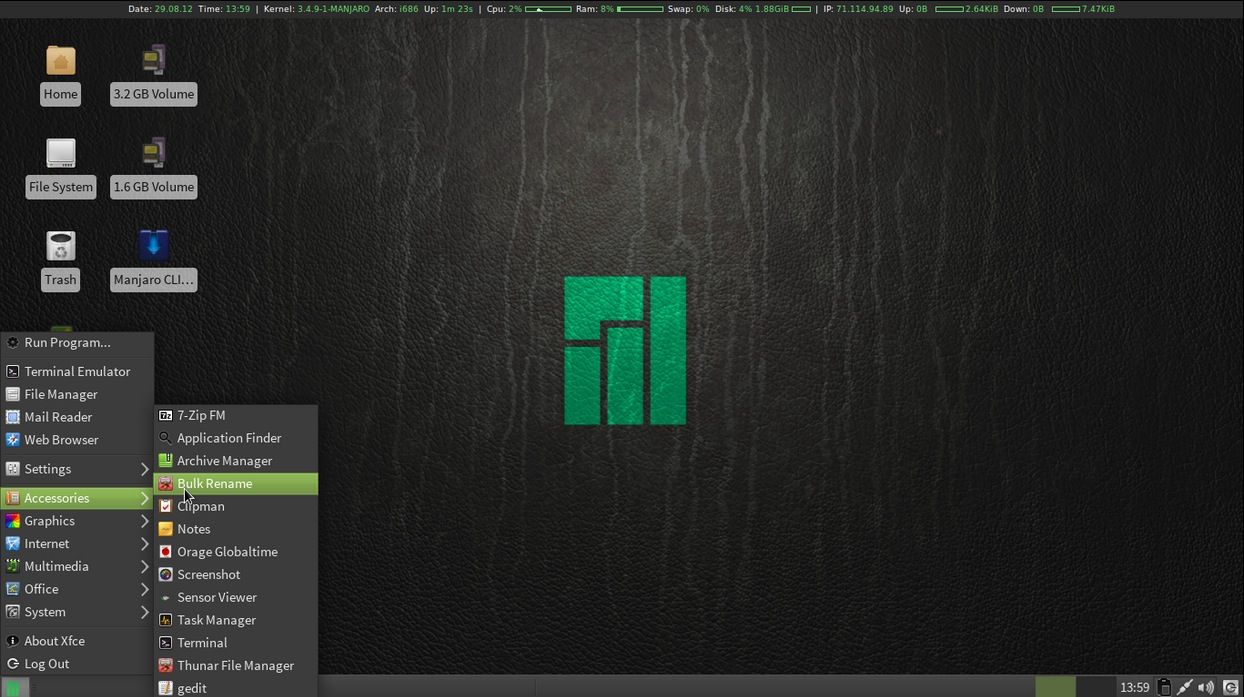
Linux - Developed by Linus Torvalds as a final major university project Linux is an adaption of the ever popular and secure UNIX architecture. Linux is one of the only open source OS architectures and because of this it has seen many different versions, GUI designs and OS come out of it. Due to it's open source nature it lacks a strong company work ethic and as such the OS is seen by many to be a more "computer nerd" style of OS with heavy emphasis placed upon terminal window scripting and directory shifting to help install files. Also due to it's lack of commercial ethic it fails to retain an ease of use tutorial scheme for many users and does not have the availability of 3rd-party applications like that of Windows & Macintosh. Because of these issues it has not been as major a success as it should have been. Below are some screenshots.
 |
| Ubuntu 10.04 |
 |
| Elementary 3.0 |
 |
| Fedora 22 Beta |
 |
| Arch Linux |
 |
| Arch Linux |
 |
| Manjaro 0.8.1 |
Mobile Operating Systems
Finally the last forms of OS to talk about is of course mobile OS's. Since the advent of smartphones mobile OS's have been developed further and further and many new entries have hit the market. This has all lead to a 3-way contest between many of the major OS developers and the phones which support them. Below i have detailed the 3 major mobile operating systems.
IOS - IOS is a mobile OS developed by Apple Inc. for their IPhone smartphone series. It has many stylistic similarities to it's desktop brethren and even contains many of the same functionalities. It allows users to download apps to the phone, play games, listen to music and many other activities simultaneously. IOS has some perks other it's competitors in the fact that it's memory allocation system is faster than that of the other 2 OS's and it's minimalistic user friendly design allow many people to be able to pick it up and get used to it on the go. Also due to it's arrival on the market first it has many more apps as developers have been working with it's API's for a very long time. Since it's inception there have been 8 revisions and there will soon be a 9th. Below are some screenshots.
 |
| IOS 6 |
 |
| IOS 8 |
Android - Android is an open source minded OS developed by Google & Samsung to compete with both Windows and Apple. It has some benefits over the IPhone such as it's lower price range and more accessible OS style. There is also many different types of phone which support the OS and change the OS to suit the needs this means that there is more varience with the software from platform to platform. It also has significant support and rapport from mobile games developers due to it's quick vetting acces onto the Google play store and the varying hardware's available to the phone. Below are some screenshots.
 |
| Android "HoneyComb" |
 |
| Android Jellybean |
Windows Phone OS - Windows Phone OS is a mobile OS developed and created by Microsoft for the Nokia series of phones and tablets. It uses a stripped down and customized version of the desktop windows OS and follows many of the same stylistic designs to keep a consistent theme amongst the OS's. It is capable of storing applications to external storage devices and it has the ability to multi-thread. Designed from a Windows 8.1 basis it's start screen is extremely simplistic and minimalistic to use and has great acclaim for user friendliness. As well as these features it also boasts a good platform games developers as indie titles are allowed to be published to the windows store for free. This also allows app developers to have an app placed on both the PC and mobile versions of the windows store as they use the same language and architecture. Although it's store compared to the other OS's lacks significant 3rd-party developer support. Below are some screenshots.
 |
| Windows Phone 7.5 |
|
 |
| Windows Phone 8.1 |











No comments:
Post a Comment