Memory, Sound and Displays
How They Work and Their Functions
Intro
Now that we have covered both HCI and the differences and power of CPU's and GPU's it is now time to move onto the final area of hardware which is Memory, Sound, Displays and Storage Mediums. Within the following section of this blog I will be covering all of these various areas.
Memory
The function and purpose of memory within a computer, games console or even a mobile device is to store and archive information and data packets which the CPU will then be able to access and process at a later time. This is a useful process as it enables a much faster access of the information required by both the user and the CPU. If you did not have memory the CPU would have to search all over the many storage devices and locations to collect and find the information it required which would result in extremely long times. But, with memory the computer is able to store it within a temporary easily accessible place for the CPU to locate. The processor access this memory whenever required by the software in use and stores any repeatable or quickly required information within the memory. Below is a diagram showing the hierarchy of memory within a computer system.
Link for larger version - http://images.bit-tech.net/content_images/2007/11/the_secrets_of_pc_memory_part_1/hei.png
Now memory is a very broad term for the specific hardware's used. There are in fact 3 various forms of memory.
1. RAM
Random Access Memory or RAM for short is a form of computer memory which allows access to it randomly. Now this may sound weird but in principle it means that the CPU is able to access any piece of information it requires at will without the need for a specific logical order or access. This allows for greater speed and versatility when it comes to accessing memory. This form of memory is the most commonplace and is also the default memory standard of both PC's and many Mobile devices. The size of it can also vary from the old standard of 256MB all the way up to the 312GB size of server farms of course the more common size for both games and commercial grade computers ranges from anywhere between 2GB - 32GB. The size of a RAM directly relates to it's core function which is the ability to store temporary information for the CPU to access. Obviously then the more space a RAM has the more data it is able to hold and thus the CPU is faster and more efficient in it's tasks. Finally the last notable point to mention about RAM is that it's core selling point is that it stores a temporary amount of memory. This means that if the computer is switched off or power to the RAM or CPU get cut all the data which was stored within it is lost. Although i have reffered to the standard of memory as RAM there are in fact 3 variations of RAM which are used within computer, console, mobile systems etc. Two of which are the main ones in use and often your computer will utilize both of the following two at the same time but, for different reasons due to the pro's and cons of each. These are:
1.1 DRAM
DRAM also known as Dynamic Random Access Memory is a form of RAM which stores data in different way. The way data is stored within a memory chip is through the use of many millions or even billions of transistor's and capacitors a bit like a CPU and these all form together to create in theory a memory cell of electrical impulses. The computer will recognize the Boolean values of either 0 or 1 as the capacitors can either be charged or discharged or put simply they can either be on or off. This in turn means that the capacitors are capable of storing the information required whilst the transistors are able to allow the information to flow through and stay held within the memory.
The issue and the main difference between DRAM and SRAM is the way in which they store their memory DRAM will contain it's information within the capacitors but as even nonconducting transistors will always have a significantly small leak it means that the capacitors will only retain information for a period of time before having to be refreshed or charged frequently otherwise the information held would simply disappear. It is because of this reason that it is referred to as dynamic memory rather than static. It is also a volatile form of memory as it's information will be lost when it loses the necessary power.
The reasons for this type of memory being in use is due to it being far more common and thereby meaning that there are more variations of it. Also it is far more cheaper than that of it's static counterpart. Although due to it's need to constantly refresh it is also slower and less capable than that of other static RAM types.
1.2 SRAM
Static Random Access Memory or SRAM for short is another form of RAM management and storage which is entirely different from that of it's dynamic counterpart. Rather than relying upon many billions of transistors and capacitors it's approach is far more digital. It is a semiconductor form of memory which uses "bistable latching circuitry" to achieve it's storage of bit data. This is simply a circuit or memory cell which contains 4 - 8 transistors with soldered wiring. Due to its more advanced storage method it retains data Remanence which means that unlike Dynamic memory which needs to be refreshed static memory need never refresh. Although it is still a volatile form of memory as the information stored will be lost when their ceases to be power to the chip.
The advantages of this type of memory have already been discussed such as that of it being faster and more reliable along with reducing the need for constant refreshes. But, it is not as widely used as it is far more expensive due to the way it is used and it also comes in smaller sizes for it's price. Although in many modern PC's many RAM chips especially that of DDR3 will usually utilize both SRAM and DRAM for various tasks.
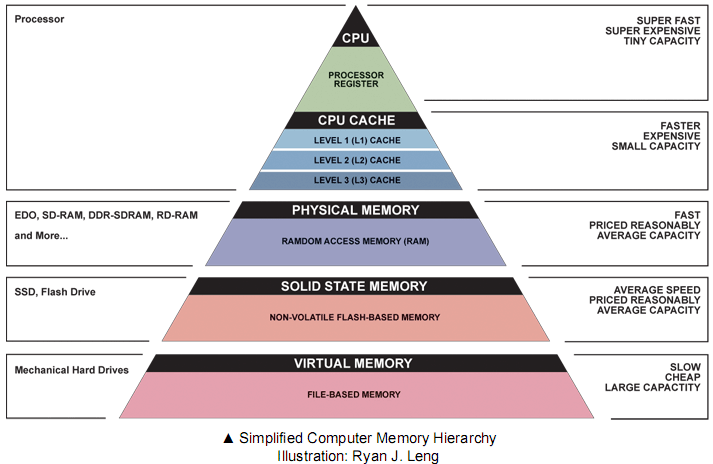 |
| (Ex. 1 - Computer Memory Hierarchy) |
Now memory is a very broad term for the specific hardware's used. There are in fact 3 various forms of memory.
1. RAM
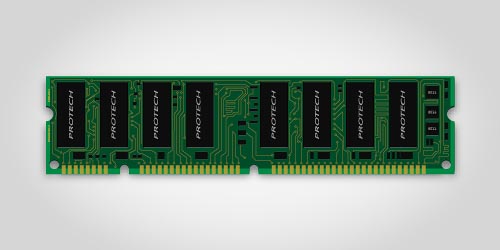 |
| (Ex. 2 - A picture of a standard DDR3 RAM chip) |
Random Access Memory or RAM for short is a form of computer memory which allows access to it randomly. Now this may sound weird but in principle it means that the CPU is able to access any piece of information it requires at will without the need for a specific logical order or access. This allows for greater speed and versatility when it comes to accessing memory. This form of memory is the most commonplace and is also the default memory standard of both PC's and many Mobile devices. The size of it can also vary from the old standard of 256MB all the way up to the 312GB size of server farms of course the more common size for both games and commercial grade computers ranges from anywhere between 2GB - 32GB. The size of a RAM directly relates to it's core function which is the ability to store temporary information for the CPU to access. Obviously then the more space a RAM has the more data it is able to hold and thus the CPU is faster and more efficient in it's tasks. Finally the last notable point to mention about RAM is that it's core selling point is that it stores a temporary amount of memory. This means that if the computer is switched off or power to the RAM or CPU get cut all the data which was stored within it is lost. Although i have reffered to the standard of memory as RAM there are in fact 3 variations of RAM which are used within computer, console, mobile systems etc. Two of which are the main ones in use and often your computer will utilize both of the following two at the same time but, for different reasons due to the pro's and cons of each. These are:
1.1 DRAM
DRAM also known as Dynamic Random Access Memory is a form of RAM which stores data in different way. The way data is stored within a memory chip is through the use of many millions or even billions of transistor's and capacitors a bit like a CPU and these all form together to create in theory a memory cell of electrical impulses. The computer will recognize the Boolean values of either 0 or 1 as the capacitors can either be charged or discharged or put simply they can either be on or off. This in turn means that the capacitors are capable of storing the information required whilst the transistors are able to allow the information to flow through and stay held within the memory.
The issue and the main difference between DRAM and SRAM is the way in which they store their memory DRAM will contain it's information within the capacitors but as even nonconducting transistors will always have a significantly small leak it means that the capacitors will only retain information for a period of time before having to be refreshed or charged frequently otherwise the information held would simply disappear. It is because of this reason that it is referred to as dynamic memory rather than static. It is also a volatile form of memory as it's information will be lost when it loses the necessary power.
The reasons for this type of memory being in use is due to it being far more common and thereby meaning that there are more variations of it. Also it is far more cheaper than that of it's static counterpart. Although due to it's need to constantly refresh it is also slower and less capable than that of other static RAM types.
1.2 SRAM
Static Random Access Memory or SRAM for short is another form of RAM management and storage which is entirely different from that of it's dynamic counterpart. Rather than relying upon many billions of transistors and capacitors it's approach is far more digital. It is a semiconductor form of memory which uses "bistable latching circuitry" to achieve it's storage of bit data. This is simply a circuit or memory cell which contains 4 - 8 transistors with soldered wiring. Due to its more advanced storage method it retains data Remanence which means that unlike Dynamic memory which needs to be refreshed static memory need never refresh. Although it is still a volatile form of memory as the information stored will be lost when their ceases to be power to the chip.
The advantages of this type of memory have already been discussed such as that of it being faster and more reliable along with reducing the need for constant refreshes. But, it is not as widely used as it is far more expensive due to the way it is used and it also comes in smaller sizes for it's price. Although in many modern PC's many RAM chips especially that of DDR3 will usually utilize both SRAM and DRAM for various tasks.
Display
Now that we have understood what memory is and how it functions. It is time then to move on to Displays.
It is thanks to your display that you are able to see the amazing visuals of a video-game, watch the awesome epic of a movie or even just read this blog! A display a device or in some cases peripheral which enables the user to see an image or images. Within the early days display devices relied upon Catho Ray Tubes or CRT to create color and display an image upon the screen but as this blog is about modern technology i will be focusing exclusively on LCD screens as they are the most popular and most widely used form across all platforms.
LCD or Liquid Crystal Display is a form of technology employed across almost all platforms and is by far the most common/popular form of display hardware on the market today. The way in which it work sis hinted by it's name. To create it's wide variety and range of colors it uses crystals which rotate and switch picture elements or "pixels" on or off which enable it to create a wide depth and range by forcing light from the back of the display device to the front. Each separate pixel much like within a CRT display contains three sub colors which are RGB or Red, Green and Blue. It is with these 3 various colors being mixed that enable the display to show such a range of colors. This range is capped at 16.7 million different color types as the combination of 3 separate colors with a fixed amount of 256 shades only allow 16.7 million different variations.
The range of devices which LCD's cater for is wide and so then is their pixel resolution ability. Below is a short of list of devices and their pixel resolutions.
DSI - Top 256px - 357px bottom 256px - 357px
3DS - Top 400px - 240px bottom 320px - 240px
PS Vita - 960px - 544px
IPhone 5 - 640px - 1146px
Samsung Galaxy S5 - 1080px - 1920px
32 inch TV - 1920px - 1080px
It is thanks to your display that you are able to see the amazing visuals of a video-game, watch the awesome epic of a movie or even just read this blog! A display a device or in some cases peripheral which enables the user to see an image or images. Within the early days display devices relied upon Catho Ray Tubes or CRT to create color and display an image upon the screen but as this blog is about modern technology i will be focusing exclusively on LCD screens as they are the most popular and most widely used form across all platforms.
LCD or Liquid Crystal Display is a form of technology employed across almost all platforms and is by far the most common/popular form of display hardware on the market today. The way in which it work sis hinted by it's name. To create it's wide variety and range of colors it uses crystals which rotate and switch picture elements or "pixels" on or off which enable it to create a wide depth and range by forcing light from the back of the display device to the front. Each separate pixel much like within a CRT display contains three sub colors which are RGB or Red, Green and Blue. It is with these 3 various colors being mixed that enable the display to show such a range of colors. This range is capped at 16.7 million different color types as the combination of 3 separate colors with a fixed amount of 256 shades only allow 16.7 million different variations.
The range of devices which LCD's cater for is wide and so then is their pixel resolution ability. Below is a short of list of devices and their pixel resolutions.
DSI - Top 256px - 357px bottom 256px - 357px
3DS - Top 400px - 240px bottom 320px - 240px
PS Vita - 960px - 544px
IPhone 5 - 640px - 1146px
Samsung Galaxy S5 - 1080px - 1920px
32 inch TV - 1920px - 1080px
Sound
So, now that we understand Displays it is time to move onto the hardware which is responsible for Sound. First of all to keep things simple as audio hardware is vast encompassing area i will be referring only to PC sound-card hardware to explain my point so as to keep us on track and not to get confused by the various nuances of different hardware although much of the principles are the same.
Within the early days of computing sound-cards were not existent and analogue was the supreme ruler in all audio affairs. Due to this PC's were completely incapable of producing or reproducing sound of any kind save for a simple sine wave beep which could be modulated, decayed and pitch tuned but it was extremely basic and didn't provide much in the way of audio fidelity in the time. Enter the sound-card and analogue audio conversion.
Within every modern computer today is at least a basic sound-card plugged into a PCI/PCIE- slot which contains 4 sub components. These are:
ADC
An Analog to Digital Converter is a small chip capable of processing analogue audio waves into a digital bit stream data signal which is readable and editable by the computer. An example would be this: Imagine you are using a microphone to sing into an DAW and you are recording your voice. The ADC will be converting the analogue signal of voice and turning it into a digital signal for the computer. The in which this process works is by taking the analogue audio and measuring the frequency ranges which it contains from Hz to Khz these are all taken at frequent intervals and are what is known as the sampling rate of a card. By having a higher sample rate the computer is able to more accurately trace the frequency ranges of the signal and provide a cleaner conversion at the cost of more space. Currently the highest sampling rate available is 192 Khz 32 bit.
DAC
The Digital Audio Converter or DAC is simply the ADC in reverse! Let's say you have recorded your song and finished it and you want to play it back for your friends to hear. When you press the play button the sound-card takes your digital signal and converts it back into an analogue signal which is then able to be played by the speakers of your headphones, monitors etc.
PCI
The PCI or PCI-E port is simply the slot on your motherboard which the sound-card is plugged into for both the CPU and Hardware Abstraction Layer to communicate and translate with.
I/O
This is simply the Input and Output connections of your sound-card for peripherals such as limiters, speakers, monitors, mixing desks etc.
Within the early days of computing sound-cards were not existent and analogue was the supreme ruler in all audio affairs. Due to this PC's were completely incapable of producing or reproducing sound of any kind save for a simple sine wave beep which could be modulated, decayed and pitch tuned but it was extremely basic and didn't provide much in the way of audio fidelity in the time. Enter the sound-card and analogue audio conversion.
Within every modern computer today is at least a basic sound-card plugged into a PCI/PCIE- slot which contains 4 sub components. These are:
ADC
An Analog to Digital Converter is a small chip capable of processing analogue audio waves into a digital bit stream data signal which is readable and editable by the computer. An example would be this: Imagine you are using a microphone to sing into an DAW and you are recording your voice. The ADC will be converting the analogue signal of voice and turning it into a digital signal for the computer. The in which this process works is by taking the analogue audio and measuring the frequency ranges which it contains from Hz to Khz these are all taken at frequent intervals and are what is known as the sampling rate of a card. By having a higher sample rate the computer is able to more accurately trace the frequency ranges of the signal and provide a cleaner conversion at the cost of more space. Currently the highest sampling rate available is 192 Khz 32 bit.
DAC
The Digital Audio Converter or DAC is simply the ADC in reverse! Let's say you have recorded your song and finished it and you want to play it back for your friends to hear. When you press the play button the sound-card takes your digital signal and converts it back into an analogue signal which is then able to be played by the speakers of your headphones, monitors etc.
PCI
The PCI or PCI-E port is simply the slot on your motherboard which the sound-card is plugged into for both the CPU and Hardware Abstraction Layer to communicate and translate with.
I/O
This is simply the Input and Output connections of your sound-card for peripherals such as limiters, speakers, monitors, mixing desks etc.
Games Storage Mediums
Now then it is time to move onto the final piece which is that of storage mediums for games and games hardware.
Believe it or not storage mediums are still a new invention within the hardware world having only made a commercial debut onto the market just over 3 decades ago and consoles have only managed to embrace fully as of 2 decades ago. So they are still new inventions and thus innovation and advancements are happening all of the time within this sector with many new failed and successful technologies being created. Within this final section of the blog i will be detailing 2 of the most important storage mediums in use today.
Flash Memory
Flash memory is quickly increasing and extremely popular storage medium which is hitting the market today thanks to the advent of hardware such as SSD's and PS Vita's, Nintendo 3DS use of internal flash memory. Although hitting the market in the form of SD Cards within the late 90's and having been designed with portability in mind it is now capable of having storage sizes of up to 4TB in the case of SSD's as well as up to 128GB in the case of Internal and SD card space sizes. It's significant advantage is it's reliability and speed which is unparallelled within the storage sector although due to it's extremely new arrival onto the scene it is still a new experimental and expensive hardware which can cost anywhere from £250 for 750GB of storage space. It is extremely common amongst mobile and tablet devices.
Disc Based Storage
Now due to the different technologies i have split disc based storage into 2 sections so as to help better understand the differences between the various capabilities of the technologies.
HDD
One of the original versions of disc based storage the HDD is one of the most common storage types in the market today coming bundled with almost any new PC, Console, Laptop etc. Due to it's low cost the amount of space you can buy for your money is incredible. But, unlike flash there are many moving parts and thus the potential for failure is high, They are also slower than that of their flash based counterparts due to the reliance of moving mechanical parts and it's dynamic nature.
CD/DVD/Blu-Ray
Following on from HDD's are fully disc based storage mediums. These type storage medium have been around since CD's and Floppy drives. They have also proven extremely popular amongst the entertainment media industry especially that of the games industry. Originally they made their debut for consoles and PC' s back in 1995 but, they could only hold 700MB of data at the time and were writable only once. This was a brilliant method of stopping piracy which began during this time. Now though we have had many advancements in disc based storage mediums and we now have various forms of discs on offer. Up until this year DVD has been a prominent figure which was capable of 4.7GB of data per disc and they are both readable and writable. But, since 2007 a new disc format has become champion known as Blu-Ray. Developed and cocnepted by a joint venture of Sony and PHilips this disc format is capable of holding at least 12.4GB of data all the way up to a whopping 34.5GB of data per disc. It is also dual layered and therefore is not as destructible or volatile as that of the DVD. It's downfall however is it's read speed the speed of a blu-ray disc spins slower than that of DVD and so in many cases data must be installed from the disc to help speed load times. Nevertheless it has quickly cemented it's place on the market and is now the default technology of both the Xbox One and PS4 consoles.
Believe it or not storage mediums are still a new invention within the hardware world having only made a commercial debut onto the market just over 3 decades ago and consoles have only managed to embrace fully as of 2 decades ago. So they are still new inventions and thus innovation and advancements are happening all of the time within this sector with many new failed and successful technologies being created. Within this final section of the blog i will be detailing 2 of the most important storage mediums in use today.
Flash Memory
Flash memory is quickly increasing and extremely popular storage medium which is hitting the market today thanks to the advent of hardware such as SSD's and PS Vita's, Nintendo 3DS use of internal flash memory. Although hitting the market in the form of SD Cards within the late 90's and having been designed with portability in mind it is now capable of having storage sizes of up to 4TB in the case of SSD's as well as up to 128GB in the case of Internal and SD card space sizes. It's significant advantage is it's reliability and speed which is unparallelled within the storage sector although due to it's extremely new arrival onto the scene it is still a new experimental and expensive hardware which can cost anywhere from £250 for 750GB of storage space. It is extremely common amongst mobile and tablet devices.
Disc Based Storage
Now due to the different technologies i have split disc based storage into 2 sections so as to help better understand the differences between the various capabilities of the technologies.
HDD
One of the original versions of disc based storage the HDD is one of the most common storage types in the market today coming bundled with almost any new PC, Console, Laptop etc. Due to it's low cost the amount of space you can buy for your money is incredible. But, unlike flash there are many moving parts and thus the potential for failure is high, They are also slower than that of their flash based counterparts due to the reliance of moving mechanical parts and it's dynamic nature.
CD/DVD/Blu-Ray
Following on from HDD's are fully disc based storage mediums. These type storage medium have been around since CD's and Floppy drives. They have also proven extremely popular amongst the entertainment media industry especially that of the games industry. Originally they made their debut for consoles and PC' s back in 1995 but, they could only hold 700MB of data at the time and were writable only once. This was a brilliant method of stopping piracy which began during this time. Now though we have had many advancements in disc based storage mediums and we now have various forms of discs on offer. Up until this year DVD has been a prominent figure which was capable of 4.7GB of data per disc and they are both readable and writable. But, since 2007 a new disc format has become champion known as Blu-Ray. Developed and cocnepted by a joint venture of Sony and PHilips this disc format is capable of holding at least 12.4GB of data all the way up to a whopping 34.5GB of data per disc. It is also dual layered and therefore is not as destructible or volatile as that of the DVD. It's downfall however is it's read speed the speed of a blu-ray disc spins slower than that of DVD and so in many cases data must be installed from the disc to help speed load times. Nevertheless it has quickly cemented it's place on the market and is now the default technology of both the Xbox One and PS4 consoles.

No comments:
Post a Comment