Monday, 8 June 2015

13 API's

API's

Intro


    Now we are nearing the end of this blog as we have understood the industry and it's history, the hardware which helps runs the software and the software which interacts with the software. So the only section left to explore is that of API's the little code snippets which help your engines render and your audio. So, let's crack on.

What is & What are API's


    The meaning of an API or "Application Programming Interface" takes many people ages to explain but, put simply an API is a collection of code which contains preset algorithms and functions for other programmers to use. So think of the previous section of this blog when it came to scripting languages. As we saw, a games engine makes use of programming languages and preset commands for the user to program and this is why many games engines scripting languages are referred to as API's. Now these are useful because they allow programmers to simply reference and call necessary commands which helps speed the programming process along as there is no need to re-type the same code or calculations over again when someone has already done. For example if you were to use physics for a characters fall animation you could either code it yourself and take more time and resources or simply reference the necessary commands which are already pre-built within the API and save time.

Types of API's


   Now that we understand or at least have a basic understanding of API's it's time to take a look at the various types available, what they are and what they are used for. So, first up is:
 

OpenGL


    OpenGL is a cross-platform API developed by Silicon Graphics Inc. and released in 1992. It is a 2D and 3D vector rendering based API which allows 2D and 3D complex objects and geometry to be rendered in real time by interfacing with the GPU in a process called "hardware-accelerated rendering". This is a form of rendering in which complex 3D lighting and geometry rendering calculations are done by OpenGL API itself and is referenced by programmers who developed the game, it's engine and it's shaders which are programmed in a separate graphical based language. It is extremely popular among unix, and open source based operating systems such as Linux and Solaris. It also has a strong foundation within the PS4 console being used for all of it's 3D functionality.

OpenAL

   OpenAL works in many similar respects to that of OpenGL the only difference being in what it is used for. It is again another open source API library which is used for audio within games and game cut-scenes. It is designed to add and help render 3D positional audio and 5.1 surround sound mixing along with compression technology that is near loss less when running games. It again enables developers to program and use the API to help add many of the audio process's with the least amount of effort as most of the audio capabilities are left to the OpenAL API to handle and render in game.

DirectX


    Finally the other popular API which actually encompasses 3 separate API's within it. This deal with audio, video and graphic API's for use with any game being developed for Microsoft OS's or platforms. This is why it has seen extremely popular use with Triple-A developers and is implemented on every Microsoft console and PC.

   Direct3D which is directX's 3D rendering and lighting API performs calculations for shadows and advanced rendering of 3D and 2D geometric shapes which are compatable with shading and computer graphic languages such as Cg, HLSL & ShaderLab. This enables developers to continue developing the game without the need to create advanced graphical calculations as the API already handles the brunt of the 3D work. DirectX is now in it's 12th revision and supports deferred shading techniques and advanced physically based shading/rendering.

12 Games Application Software

Games Application Software

Intro


   For games to be built and run it requires a vast amount of work, talent and of course software. With that in mind this section of the blog is dedicated to all sections of the application software used within the games industry. For example we will be looking at the various language types used to create both gameplay and game making programs along with how they work and what it is exactly that they are.

What are Computer Programs?


   The first question to ask when dealing with this area is, of course: "What is a computer program?" Well a computer program is in extremely simple terms a fixed set of instructions which the computer will carry out when executed. The exact process and what it does is all decided by the language and syntax with which the program was coded. Whether the computer opens a notepad and begins printing on-screen what you type or doing arithmetic calculations such as addition and multiplication, these are all example of what a computer program is. A computer program can be likened in many ways to that of flat pack furniture or blueprint instructions. A simple yet confusing array of instructions which detail what to do and when.

What are Programming Languages?


   So we have now understood what computer programs are and that they are controlled and created using programming languages. But, then we are left with another question before moving on and that is this "What are programming languages?"

   Well, for a computer to actually carry out any of the functions or process's that you want it to you must be able to communicate to it and tell it in a way that the computer can understand. As we have talked about in earlier sections of this entire blog (Unit 20) a computer runs by simply processing a series of I/O states of on and off states, this is also known as binary. Binary is the actual final representation of a language which a computer understands also known as "machine code" because it is what the hardware actually reads and all programming languages eventually get compiled and translated by a lexical analyzer into this basic of all languages and from here the computer reads and performs it's functions as specified. This is the purpose of programming languages. A programming language is in many ways similar to that of a real life language all complete with it's own syntax, word rules and grammatical placements. The difference though lies in the way in which you speak.

   Just like modern day languages there are a vast number of variants when it comes to programming languages and again like modern languages they all communicate the same things just in various ways some of which are vastly superior whilst others are useful for specific tasks. Hence why a number languages are used purely for logical operations whilst others are used for more OOP based programming ways.

   Some popular languages used in the modern games industry for software will include: C++, C#, Lua, JavaScript, Java & Assembly. All of these languages are on some if not all of the modern day console systems and are used within all video-games developed. But, to note Assembly is an extremely basic and hard language which communicates directly with the computer. It is also designed for every individual architecture so one console's Assembly language will be different to that of a PC or other console's.

Types of Programming Languages


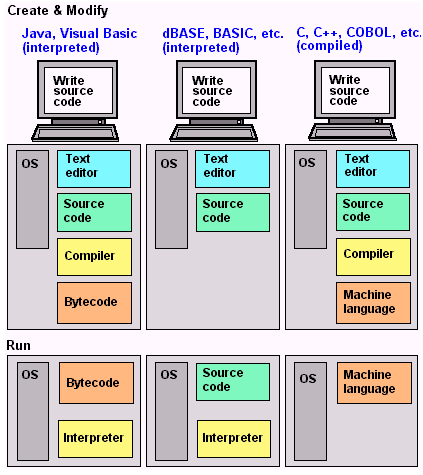
   Also, there are various forms and types of languages available which deal with different features. There are languages as stated above, designed for purely logic based rules, languages designed to create programs and control characters, languages which connect to the hardware and tell it what to do and when etc. So for this following area i will be talking about some of the various types and their uses. Before continuing on below is a diagram which can be used for reference after each explanation of a language type.


(Ex. 1 - Diagram showing what happens during the coding and execution/run stages of interpreted and compiled languages respectively.)

Interpreted Languages


   An interpreted language is a form of programming language which will execute all of it's programmed instructions straight away without a need for compilation. As it is coded it will execute the instructions on the fly translating it's segments or statements into pre-compiled subroutines which are then translated into machine code. Now interpretation and compiling are essentially the same thing the difference occurs in the way in which it happens. In this case it is in real-time and directly translated into pre-compiled segments which make for faster translation and on-the-fly execution. They are also referred to in many cases as scripting languages purely because most of their functionality works within that of a parent program which was programmed by another language, whereas compiled languages create programs free of any dependency on external programs and their functions.

Advantage's


   There are many pro's to this type of language but by far the biggest is within it's forgiving nature. As in many cases it allows more less severe errors pass through unnoticed as the computer is able to fill them in itself. This makes it useful fro either beginner programmers or programming which does not require the need for excessive importance placed upon memory management.

Disadvantage's


   It's advantage is unfortunately also it's disadvantage as well. Although it enables the programmer faster and quicker response to coded results and allows them to be sloppy to an extent. It also takes the computer longer and takes more memory for the computer to translate and actually understand the information that has been given to it. It also does not have as much access to lower level hardware and features so it is not able to code memory management or garbage collection process's which would otherwise make it faster.

Examples


   There are many examples of interpreted languages and many of them are used within actual video-games and video-games hardware. 

   "Java" - Java is an extremely popular interpreted language for many reasons including one stated in an earlier section of this blog which is of course it's platform in-dependency which it allows it to run on many systems. Part of this is in due thanks to it's interpreted nature. It is also a popular interpreted language which has seen use within html5 and other web browser based games along with being a mainstay for applications and games built on many mobile devices.

   "C#" - Another extremely popular interpreted language is that of C# a programming language based off of C++ and Objective C it has seen use within some games and is even featured as a main language within the Unity and Game Maker Pro games engines. But, it's main functions as a language is with that of game development tools. Due to it's interpreted architecture and it's higher level language origins and heritage it is extremely popular when it comes to developing rendering engines, modelling software, games engines and other game development tools.

Compiled Languages


    After interpreted languages we move onto the languages which have seen more use within actual games and the development of games, which is that of compiled languages.

   A compiled language is in many respects similar to that of an interpreted language in the fact that both are converted and translated into binary or machine code. But, compiled languages have a different method of performing this task. When using a compiled language you must first write your code and debug it to ensure no errors whether grammatical or logical are present and then the code must then be compiled before it can then be executed/run by the system. So in more simpler terms a programmer will type something along the lines of:

If(doorOpens == true)
{
     audioClip.PlayOneShot();
}

   This will then be placed into a compiler which will then in turn convert this into machine readable code or "binary". So in order it would go: 1. human readable code 2. Compilation 3. Binary output.

Examples


   There are many examples of languages which are compiled and most if not all have a heavy usage within the industry.

   "C++" - C++ is one of the most important and most used programming languages available today and is used heavily within the development of video-games. It is also a multi-paradigm language which means that it allows both high-level and low-level language modification.

   "Objective C" - Objective C is another important and influential language which is used extensively within the industry although it sees more use for both Linux and Mac OS operating systems due to their architectures.

Advantages


   The advantages to a compiled language are that it is faster than an interpreted language and allows far more access to lower level functionality such as advanced memory management and garbage collection it also allows far more control over many more advanced features.


Disadvantages

   The main issues with compiled languages are: Because it requires a compiler it can take an extremely long time to compile code segments which can cause project slowdowns if errors are made as the compiler will only report errors after compilation has finished thus rendering the whole compilation process a waste. It also poses security risks due to it's advanced base layer modifications and it's multi-paradigm architecture which make it possibly unsafe for many programs and OS's thus requiring the need for further security coding and possible future updates.

O.O.P (Object Oriented Programming)


    Now that we have understood what programming languages are and their various types i would like to take the time to explain in-depth a little bit about Object Oriented Programming which is by far one of the most important programming paradigms in games programming and games developement in general.

   OOP is a type of programming paradigm which allows items, actors, meshes etc. within a programming language to be written and collected as objects which are all able to be communicated with each other. Within OOP all of these objects are able to be given their own characteristics and dependencies which allow them to be organized into collections or classes of similar or part similar objects. They are also able to be given their own behaviors allowing them to interact with one another.

   Now this may be extremely confusing and it might seem like i am beating around the bush but, it is because OOP is a hard concept to explain so let's try to simplify it with an example. Let's say that we have a class which defines all of the structures of animals within a game.  Within this class all of the enemies will then be defined as separate objects which are then able to be assigned different things such as colour, height, size etc. We also will be able to assign various different behaviours to the animals such as eating phases or sleeping phases. If this still isn't helpful then the diagram placed bellow may be able to help.

(Ex. 2 - Diagram highlighting OOP by declaring a class named bank account and then showing how it's objects here named "Account Holder" & "Account" can hold separate properties and details within the sub-classes.)


   OOP is a very useful and extremely important paradigm for scripters and programmers as it allows easier and more logical access as it structures software variants into manageable individual objects which can be modified without causing issues to the rest of a program. It is also extremely flexible and and easy to update and modify programs which are written.

   Examples of OOP languages are ones such as: JavaScript, Java, C++, C#, Objective C, Lua etc.


Scripting


   Earlier we discussed programming languages and within it we touched upon scripting. So in the final part of this blog i will detailing and talking about scripting and scripting languages within games software.

What are Computer/Games Scripts?


   Scripting is different from programming although the languages used will be the same just with variance for each specific program. Scripting is the process of coding within an environment whereby the scripts and code written will be run and executed by an engine itself or script engine. Unlike programming languages scripts do not create physical memory or take any actual processing overhead when not in use because they are simply text documents with code written in them which is then executed by the engine. For example when using Unity if you were to type code within any of it's languages you will be using pre-programmed and pre-compiled functions which are then executed by the engine which in effect make these snippets of code "scripts".

   With that in mind there are various types of games scripts available for both games engines and game development software alike.


Types of Games Scripts


    Because there are many different types of programs and they have various different functions there are also many different types of modified languages which the programs may use below are 4 popular ones.

 UnrealScript


    UnrealScript is a scripting language developed for use with the unreal from 1.0 to 4.5.7 (the current version) it is developed by Unreal for use in the engine to help people code behaviors, mechanics and functionality into the engine. It is based upon and is a variant of C++ but is easier to use as it doesn't allow extreme access to the more advanced and low level features of the language and many of the commands and algorithms are pre-programmed and need only be called which makes easier for users of the system.

QuakeC


    QuakeC is a scripting language which was developed for use with the game Quake and it's engine back in 1996 by Id Software. It allows players to do unique AI triggers, mechanics and functionaltiy with the game. It was developed to help allow new coders and users to be able to create mods and games with engine. It's language is loosely based upon Objective C syntax.

MAXScript


   MAXScript is a scripting language designed for use with Autodesk's 3d all-in-one package which helps create unique functionality for use within the program. For example users are able to code unique modelling features which enable the program to do certain functions for them such as creating circles which make use of quads. It is based upon the python programming language and has added unique syntax in the last couple of years.

11 Drivers for Games Hardware

Drivers for Games Hardware

Intro


    As discussed within the hardware sections of this blog we have talked about the various forms of hardware which is required to help your computer display graphics, play sound connect to the internet etc. But, although the hardware is responsible for this functionality within the OS they rely upon drivers to help understand what it is that is connected and how the OS can interact with it, add and fix known software issues or add new additional and useful features which can drastically upgrade it. So, in this section of the blog we will be talking about some of the popular types.

Sound-card Drivers


    The drivers for a sound-card enable the operating system to understand what the sound-card is and how it is able to interact with the OS. So for example when you look at the volume properties in your computer you are interacting with your sound-cards drivers as they allow the computer to understand what bit-rate and bit-depth the sound-card is able to handle along with whether it is able to record and it's latency and how many I/O slots there are. Drivers are also able to be downloaded to patch or add new features to the actual sound-card through software.

Graphics Card Drivers


    In an extremely similar to sound-card drivers graphics cards make use of drivers so that the operating system is able to actually register and use the graphic card within the OS and in practical scenarios. Along with this the driver also helps tell the computer what resolutions it is capable of running along with how much power it will use and in what it will function with the OS whether it will be used exclusively for games or whether it will be used for the GUI's of the OS itself. New driver updates also allow for higher resolution rates and more optimized algorithms for rendering along with new updates to help add support for newer shading methods available to the commercial market along with standard bug fixes to help fix issues.

NIC Drivers


   Finally we have Network Interface Controllers or NIC's as they are known. These are network cards which allow the computer to access the internet through the use of Bluetooth, wi-fi or Ethernet sources. The drivers for this card function the same again as the previous two by allowing the computer's OS and motherboard to understand what it is and how it will function within the OS. In this case it tells the computer how to access the internet through the varying sources at it's disposal. Newer driver updates may add support for newer data encryption types such as WPA-2 the latest wi-fi securing method for wi-fi hubs along with faster data methods for handling the data being sent to the NIC. There will also be bug fixes as this is an area of the computer which is susceptible to virus's.

10 Operating Systems for Games Platforms

Operating Systems for Games Platforms


Intro


    When talking about software it is impossible to miss that of Operating Systems. These are by far the most important and complex pieces of software which are responsible for your ability to run games and game development software. So with that in mind let's begin.

What is an Operating System


   Now before we continue with the finer details of an operating system it is probably best if I first answer the forefront and prominent question which is "What is an operating system?"
   An operating system is single-handedly one of the most important pieces of software which your computer or console will contain. An operating system is simply a software management system which interfaces and deals with the base layer of a computer. It is responsible for actually allowing the various sections of your hardware to interact with each other and allows you the user to interact with them. It also allows the user to develop or use applications upon the system. An operating system can be thought of as the brain of a computer, sending and accepting information to and fro from section to section all whilst making use of it's hardware such as memory and CPU's. Simply put, without you the user would not be able to use your computer without it.

   Along with allowing access to hardware and hardware to access each other it also provides an environment for a user to execute single or multiple commands or execute applications all within an interface which is kinder to the user than what the computer actually reads and performs. Now with that out of the way, it is time to explain the various areas and examples of an operating system in more detail. First I will be explain the still relatively new advent of GUI's and their place within an OS. Then I will discuss the 4 different types of operating system available to consumers. Finally i will give examples of popular operating systems within different hardware's.

GUI's


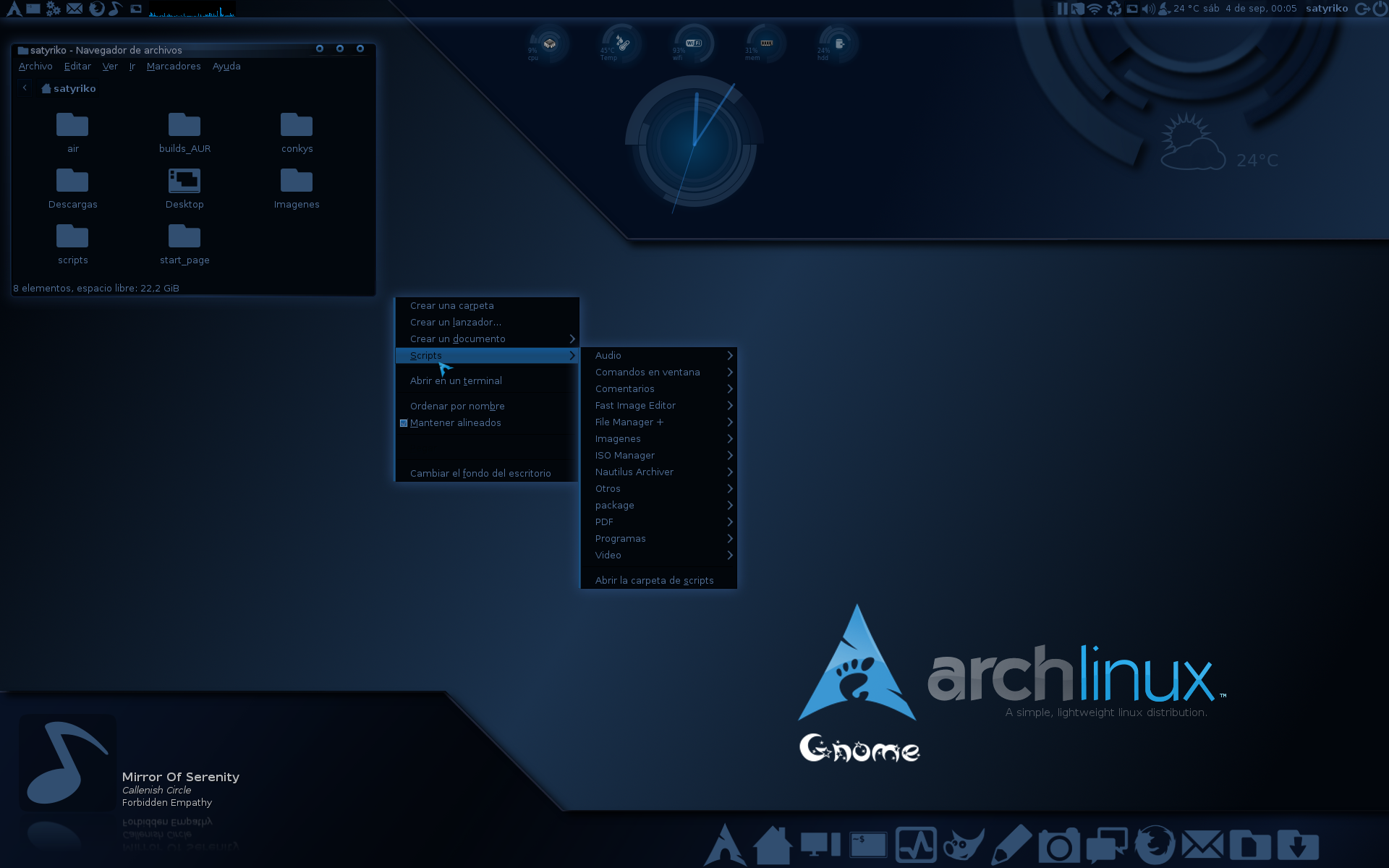
    Operating systems were not always the fancy looking and interactive items which they are today. When they first began and indeed throughout most of their infancy visual input was either non-existent or if present it was merely text displayed upon a screen which allowed the user to sift through directories and applications which could have data inputted but, and i stress again there was no interface. Popular proponents and uses of this type of operating system were purely due to technological limitations of the time. Below are a couple of picture examples demonstrating early non GUI based operating systems.


(Ex.1 - DOS (Disk Operating System) circa 1985)


(Ex. 2 - Arch Linux 2009)

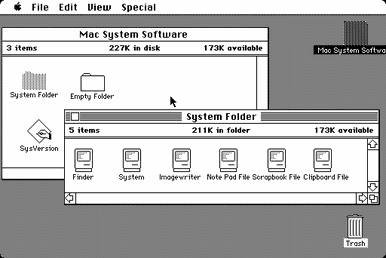
   Enter then the GUI or Graphical User Interface as it is more commonly known. GUI's were at the period of the 70's an extremely new concept and many companies were to trying to manufacture concepts and ideas on how to develop an efficient and user friendly GUI system with the given hardware of the time. There were many attempts all of which have set the rules and methods which are in many cases still carried through in even modern GUI developments. But, a major breakthrough was that of the Macintosh and the Apple Lisa released in 1984 by Apple Inc. This OS set a new standard and ability for GUI based systems along with new core concepts such as preemptive multitasking and Graphical oriented process communication it also featured a stable set of accessories such as clocks, calculators and notepads. 

 
(Ex. 3 - Macintosh OS 1984 showing the various GUI based functionality of the system such as windows and icons.)


Although many other companies had developed parts this was one of the original OS's to put together these ideas and create a stable, graphical working environment. After the success of the Apple Lisa (and later the Apple IIgs.) Many other GUI developments were being made such as overlapping windows, resizing options and even graphical effects. The thing that helped boost these developments was the arrival of the Windows 3.X line of operating systems with it's own uniquely developed GUI system created by Microsoft. With these two companies in competition many developments and strives were made leading to the modern day GUI systems which are using in mobile devices, tablets, PC's, laptops, consoles etc. So simply put, GUI's are the windows, icons, pointers and other various graphical representations you see upon your screen. The browser which you are using at this very second is a GUI so is the task-bar or docky of your OS or even the battery icons on your phone these are all GUI's.


Types of Operating Systems


   Now that we have discussed the GUI advancements and what operating systems are it is time then for us to move onto the various types of operating systems available to users.


RTOS (Real Time Operating System)


    Real-Time Operating Systems or RTOS's are real-time run operating systems designed for use with machinery, scientific instruments, mining process's and other automated machinery. There are pre-programmed to follow the exact same order of functions over and over whilst managing the various sub-systems being used. These often have little to no external functionality other than for debugging and repairing purposes. Due to their nature they are often not used and seldom seen within the commercial sector as they are more custom developed and tailored to a specific hardware's function or needs.

Single User, Single Task


    Single User, Single Task operating systems were used heavily with mobile devices throughout the 90's and early 2000's as well as being featured within computer operating systems in the 70's. A Single User, Single Task operating system is a fairly self-explanatory OS. It is simply an OS which is capable of handling one user and running only one requested application at any one instance. For example a popular SUST OS would be that of MP3 players. These devices allow users to be able to navigate it's contextual menu's and GUI's but only allows the playback of one song at any one time. Of course more modern ones are capable of advanced browsing and such now, but, early models were perfect examples of this type. Other examples include PDA's which allowed the user to write spreadsheets or documents, early mobile phones which allowed the user to access SMS messaging and games, Very early tablet devices etc.

Single User, Multitask


    Now, after SUST OS's come SUMT OS's or Single User, Multitask OS's. Now these types of operating system are now extremely popular and most major devices run them. The likely chance is that right now you are using one to read this very blog. A SUMT OS is capable of allowing the user to navigate various directories, listen to music, watch a video, write a document and message friends simultaneously. This is the exact function of SUMT OS to provide the user with multi tasking capabilities. Popular examples include: PC operating systems, modern smartphone devices, modern tablet devices etc. These all make use of SUMT OS's.

Multi-User


    Multi-User Operating Systems or MUOS's are operating systems which are capable of handling hundreds of multiple users at any one time, allowing them to access various shared documents and programs simultaneously. These are often referred to as networks, servers and shared drives. They have a heavy use within the games industry when it comes to hosting games servers for multiple players to connect and play on as well as being used heavily within education and office sectors to help enable files being tagged or pinned to a user so that regardless of which computer is used their preferential settings and files are all kept to their login. This makes it easier for business's to communicate and share work with other staff members thus enabling better and faster workflow's. Popular devices which make use of this type of OS would be platforms such as Servers, Render Farms, Network Drives etc.

Console Operating Systems


    So, for modern consoles to run and read data from discs or digital binaries they require the use of an OS to function. This OS is also used to help allocate memory and API's for games to access and use. Although not used in the traditional PC sense of an operating system console's make heavy use of tailor made OS's to run their console architecture's below are some common and popular console OS's.

PS4 - The PlayStation 4 developed by Sony Interactive makes use of a UNIX based OS architecture which is taken from open source code. It's unique OS is known as Orbis which is based upon a popular free Linux variant known as FreeBSD. It's architecture its extremely similar to that of UNIX based systems and it has added many new and unique design features to the architecture. Below are some screenshots.


Xbox One - The Xbox One uses a custom built form of OS which runs within a HyperVisor. This allows the console to have to functional operating systems which deal with different tasks and interact with each other. Their is the console's main OS which deals with game and store searching functionalty as well as parties and friends lists. Then it has incorporated a stripped down version of Windows 8, 8.1 and soon Windows 10. These are responsible for the various applications and design interface of the console OS. Below are some screenshots.


Computer Operating Systems


    Now that we have explored some of the more unique console OS's it is time now to switch back to the more comfortable realm of desktop OS's. A desktop OS is any operating system which runs on either a laptop, notebook or desktop based system. There are 3 popular variants and 2 popular architectures which they are based upon. Within this area i will be discussing the various popular types.

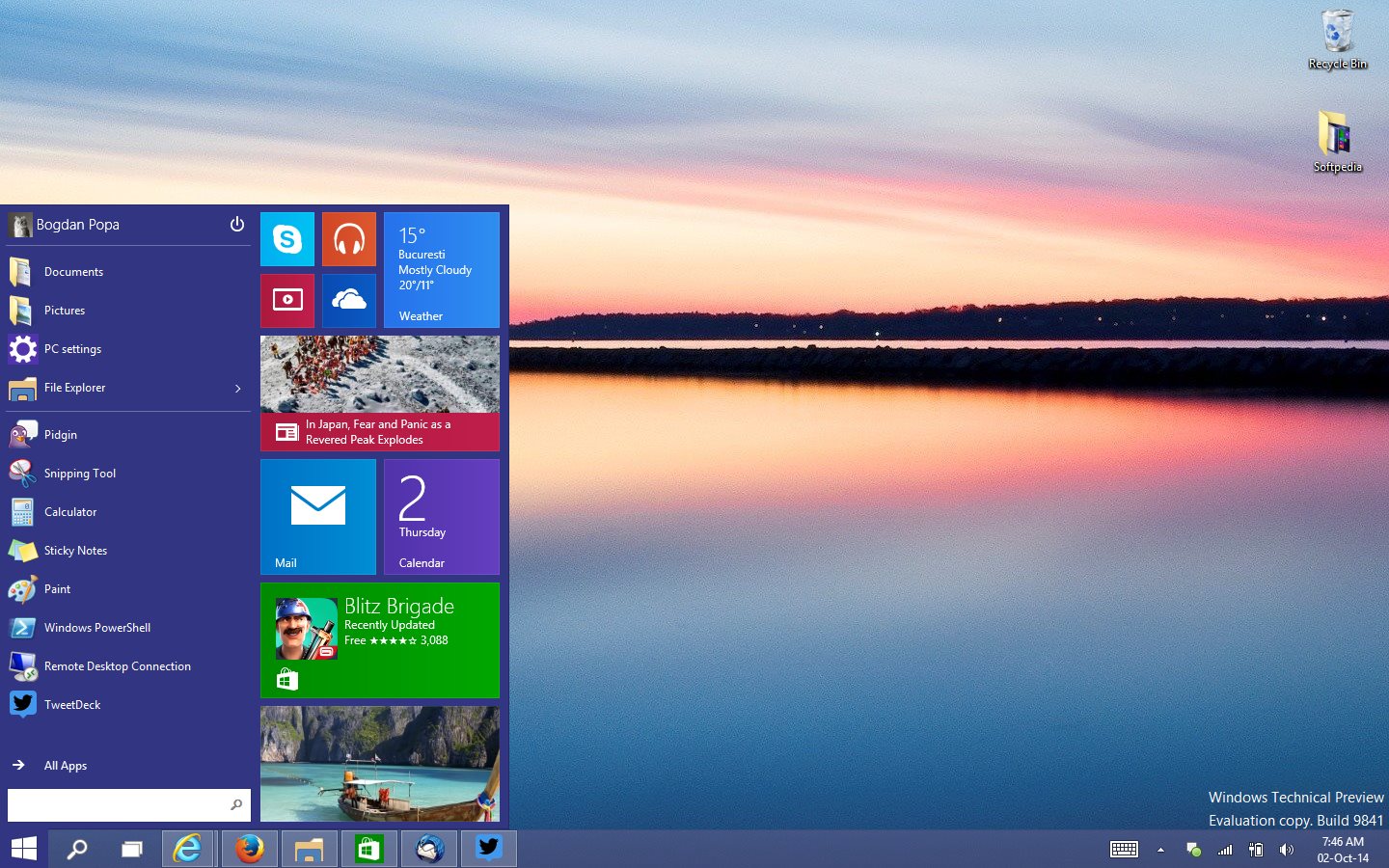
Windows - Windows along with Macintosh is the most popular OS around the world with many application developers, games developers, military institutions and government center's all making use of the OS. Originally based upon the DOS kernel Windows has since grown into an advanced and slick MUOS, SUMTOS. It is often considered more popular amongst gaming crowds due to a successful jump in the early 90's which unfortunately left Macintosh as a stigmatized OS for games. It has become popular for it's unique task bar and start button GUI interface which allows users to pin and use apps. It has also seen some newer changes with the introduction of the metro UI which has me both acclaim and critic from many people. Below are some screenshots.


Windows XP


Windows Vista


Windows 8 Start Screen


Windows 10 Development Build


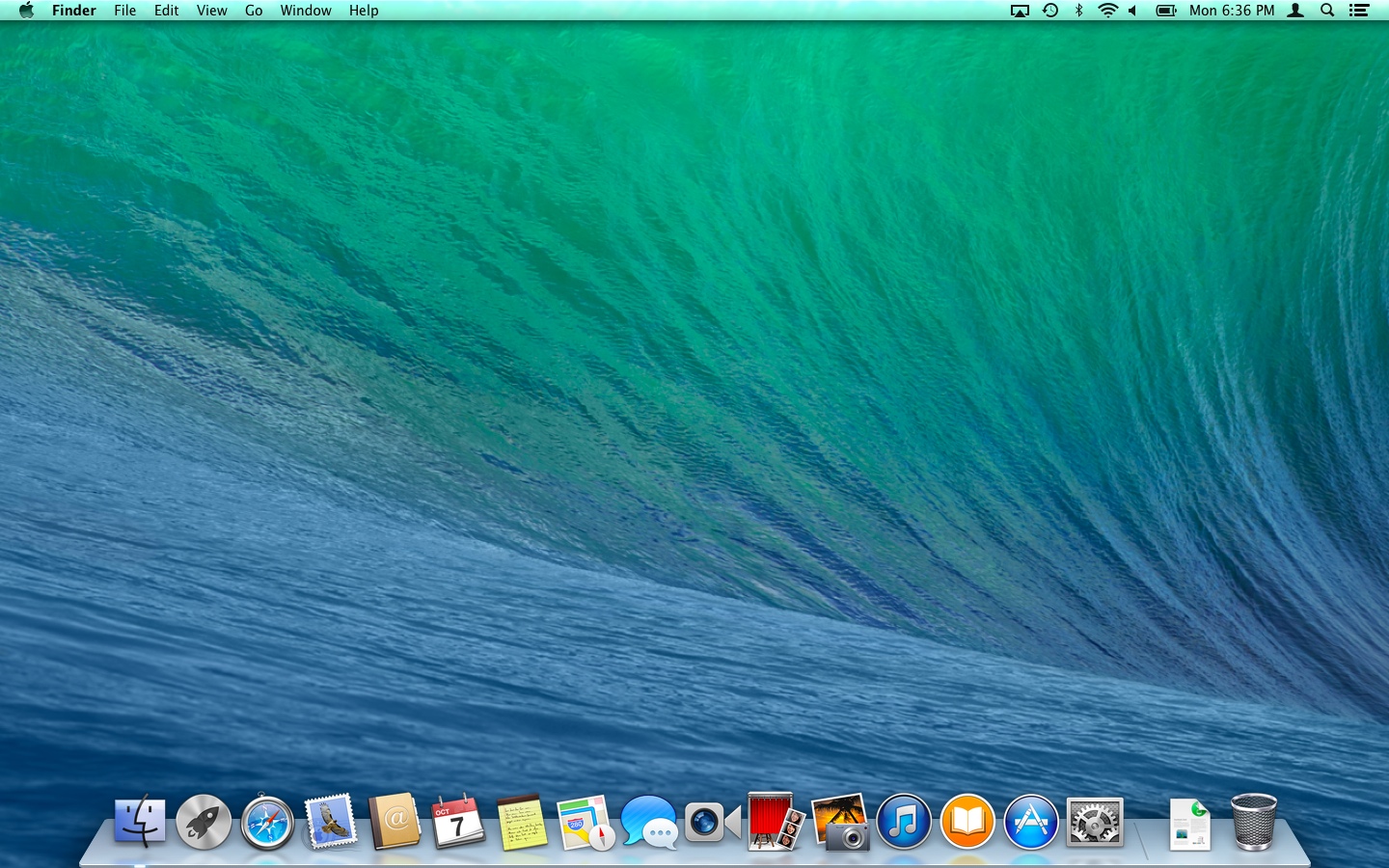
Macintosh - Macintosh developed by Apple Inc. Is another extremely popular OS which has seen use within many of the important media industries such as media, films, music and games. The OS's ease of use and slick GUI style with the use of a docky for users to pin applications to it attracts many crowds who are looking for an operating system with less technical focus and more entertainment. It has become renowned for it's minimalistic modern art design and 2 toned color schemed GUI style. It has a high fan base amongst artists and other media groups but due to a minor hiccup in the early 90's it has lost it's fervor amongst the gaming masses. Below are some screenshots.


Mac OSX Tiger


Mac OSX Snow Leopard


Mac OSX Mavericks


Mac OSX Yosemite


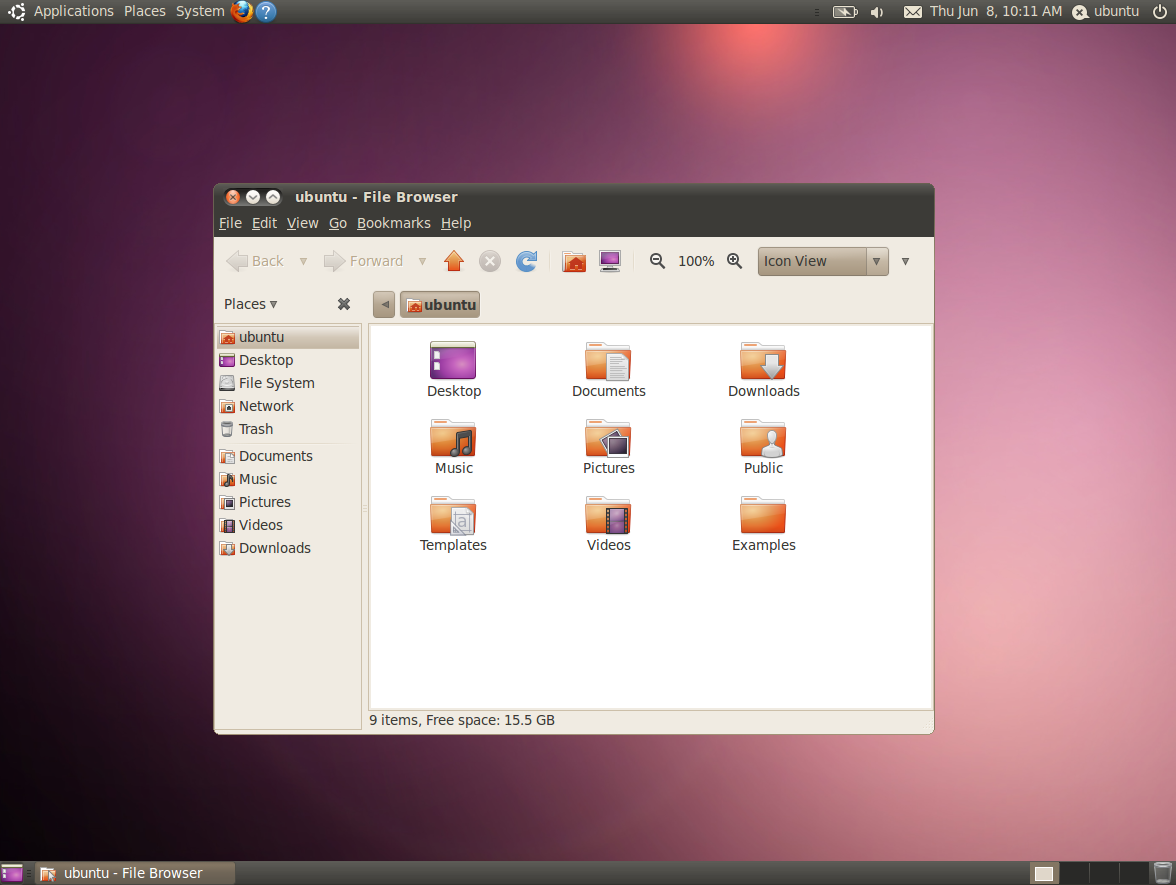
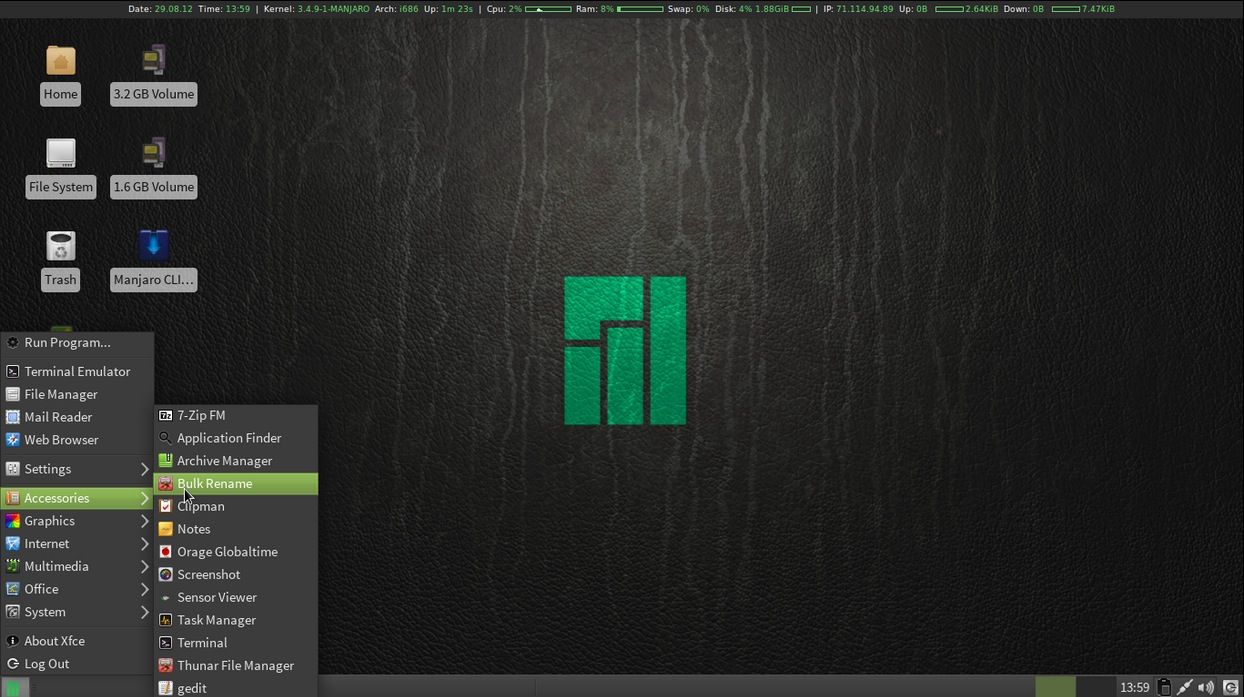
Linux - Developed by Linus Torvalds as a final major university project Linux is an adaption of the ever popular and secure UNIX architecture. Linux is one of the only open source OS architectures and because of this it has seen many different versions, GUI designs and OS come out of it. Due to it's open source nature it lacks a strong company work ethic and as such the OS is seen by many to be a more "computer nerd" style of OS with heavy emphasis placed upon terminal window scripting and directory shifting to help install files. Also due to it's lack of commercial ethic it fails to retain an ease of use tutorial scheme for many users and does not have the availability of 3rd-party applications like that of Windows & Macintosh. Because of these issues it has not been as major a success as it should have been. Below are some screenshots.


Ubuntu 10.04


Elementary 3.0


Fedora 22 Beta


Arch Linux


Arch Linux


Manjaro 0.8.1


Mobile Operating Systems


   Finally the last forms of OS to talk about is of course mobile OS's. Since the advent of smartphones mobile OS's have been developed further and further and many new entries have hit the market. This has all lead to a 3-way contest between many of the major OS developers and the phones which support them. Below i have detailed the 3 major mobile operating systems.

IOS - IOS is a mobile OS developed by Apple Inc. for their IPhone smartphone series. It has many stylistic similarities to it's desktop brethren and even contains many of the same functionalities. It allows users to download apps to the phone, play games, listen to music and many other activities simultaneously. IOS has some perks other it's competitors in the fact that it's memory allocation system is faster than that of the other 2 OS's and it's minimalistic user friendly design allow many people to be able to pick it up and get used to it on the go. Also due to it's arrival on the market first it has many more apps as developers have been working with it's API's for a very long time. Since it's inception there have been 8 revisions and there will soon be a 9th. Below are some screenshots.


IOS 6
IOS 8


Android - Android is an open source minded OS developed by Google & Samsung to compete with both Windows and Apple. It has some benefits over the IPhone such as it's lower price range and more accessible OS style. There is also many different types of phone which support the OS and change the OS to suit the needs this means that there is more varience with the software from platform to platform. It also has significant support and rapport from mobile games developers due to it's quick vetting acces onto the Google play store and the varying hardware's available to the phone. Below are some screenshots.


Android "HoneyComb"
Android Jellybean


Windows Phone OS - Windows Phone OS is a mobile OS developed and created by Microsoft for the Nokia series of phones and tablets. It uses a stripped down and customized version of the desktop windows OS and follows many of the same stylistic designs to keep a consistent theme amongst the OS's. It is capable of storing applications to external storage devices and it has the ability to multi-thread. Designed from a Windows 8.1 basis it's start screen is extremely simplistic and minimalistic to use and has great acclaim for user friendliness. As well as these features it also boasts a good platform games developers as indie titles are allowed to be published to the windows store for free. This also allows app developers to have an app placed on both the PC and mobile versions of the windows store as they use the same language and architecture. Although it's store compared to the other OS's lacks significant 3rd-party developer support. Below are some screenshots.


Windows Phone 7.5
Windows Phone 8.1

09 Platform Dependency Within Games Platforms

Platform Dependency

Within Games Platforms

Intro

   Whenever a game is made, whenever a software application is developed and whenever an audio file is created. They carry with them a set array of the various platforms which they are able to be executed, run or played on. Now some of them may be able to run across all platforms, the audio file for example if an ogg vorbis format, can be played upon every device capable of audio playback. Whilst others, take a game for instance may only be able to run on specific platforms such as the Xbox One or PS4. In any case all of these are examples of a software term known as "Platform Dependency.

What is it?

   Platform dependency is a term which refers to: (in the case of this blog.) What platforms a software application can run on. Now it's dependency may be due to: software related issues, hardware related issues or time and financial related issues. But at the end of the day it all means that a specific software will only run on a specific hardware or all hardware brands available. Now there are 2 forks to go down when it comes to platform dependency and they are: "Platform Dependent" , "Cross-Platform" and "Platform Independent." As stated above the route which a company/developer takes is due to a variety of factors and reasons.


Platform Dependent


    Platform dependent is a term applied to any software application which is only able to be run or executed on 2 or less platforms. (In the case of video-games it refers to any application which can only be run on 1 platform developed within a specific line of manufacturer consoles or on 1 OS type for PC.) It simply states that a specific piece of software can only be run on the platforms which it has been developed for in hindsight. For example take "Killzone: Shadow Fall". Developed in 2013 by Guerrilla Games and released exclusively for the PlayStation 4 system. This is a case of a game being platform specific for financial reasons. Back in 2003 Sony offered guerrilla games an undisclosed amount of money to develop a game for the PlayStation 2 system which would rival Microsoft and Bungie's FPS title "Halo". Since this venture guerrilla games have released 4 titles of the rival game franchise called Killzone. All have been released exclusively for the PlayStation console platforms. The developer is what is known as an in-house developer much like naughty dog whereby they are owned by Sony as their publisher and they develop software applications for their hardware systems.

   Now, a piece of software may choose to be developed as a platform dependent application for many factors. In the case of some software programs it ensures stability and more micro-management of updates and contextual features. In the case of games it allows finer control of the graphic fidelity and processing overhead as they are developing for a specific platform and hence will have the opportunity to take advantage of it's features. Then, in the case of Logic Pro developed by Emagic originally in 1993. By 2002 the company was bought over by Apple Inc. In a bid to join the ever growing electronic music production scene. Since this acquisition all subsequent releases of Logic Pro have been released only for the Apple Macintosh systems making it a platform dependent application. The reason for this program being a platform dependent is purely to ensure consumers will buy Apple Macintosh systems for it's use. In the games industry this is heavily prevalent with many audio engineering suites containing at least one Macintosh computer purely for Logic Pro.

   Finally in the case of Indie developers, platform dependent software may be their only route due to monetary issues and skill issues. An indie company does not have the budget that a triple-A franchise does and as such they likely will not have enough funding to develop for multiple platforms or pay licensing costs for console platforms. This ensures that their game will get made and will get released after they have made sufficient sales they then may seek to make their application platform independent or cross-platform.


Platform Independent 


* (Now for the purposes of this blog i have divided the general term of "Platform Independency" into 2 sub-sections which are incorporated into the umbrella term.)


   We then move onto that of platform independent software applications. For an application to be considered platform independent it has to be able to run on all available OS architectures or at least 6 varying platforms. These types of programs tend not to be video -games in the general sense. But rather, the API's, software programs, language compilers etc. Which make up a game or allow games to be run. For example Java is an extremely popular and flexible programming language and software API which allows a multitude of content, programs and games to be made accessible for a variety of systems. Java is one of the pinnacles of platform independent software as currently it is run on every major mobile device and is supported by every operating system other than UNIX itself and is incorporated into both 7th and 8th gen console OS's. This is what we mean by the term platform independent, a software application which is able to be run independently on any architecture regardless of hardware or software constraints.

Cross-Platform


   Now that we have discussed what platform-independent means it is time for us to move onto the second sub-section of platform independency which is cross-platform software applications. A cross-platform piece of software is very similar to that of a platform independent and so therefore they are classed and thought of as the same thing in many cases. But, they have some dissimilarities hence why i have chosen to split them for clarity.

   A cross-platform software application is any application which has been developed for 2 or more operating architectures or systems by the developer. For example if you take the popular franchise of FIFA football games developed by EA Studios. It is a cross-platform game which has seen releases upon every major home console, optimized and changed releases upon mobile devices and even tablet device games. This is a clear example of a cross-platform game which have been developed in tandem with one another. But, there is another way which cross-platforms can be made and that is through the process of porting.

   In some cases a company may only have enough funding, an exclusivity deal or even the skills to develop for only one platform. But, further down the line after they have earned additional funding from sales or have managed to hire a more professional working team they may wish to release their old game for more platforms. This is a process called porting.

   Porting is the process of moving one game or software application from one platform to 2 or more. In effect it turns a platform dependent game into a platform independent game. This is done for many reasons the top of the list being more sales and a bigger fan base. Popular examples of ported games are those of: Final Fantasy, Halo, Command & Conquer, Half Life, Deus Ex etc.

08 Introduction to Current Software Technologies


Current Software Technologies

What Are They and What Do They Do? An Introduction


Intro


   Now that we have finally talked about and understand The historical origins and Games Platforms and their importance, along with that of the hardware's which they run on and how they function. It is now time to "Take a look under the hood" so to speak and peruse the generally unknown member of the platforms which is responsible for so much. It's time to take a look at: Software. 
(Wherever examples are present i will be using the most current reference of technology at the time of writing.)

   Throughout this final section of the blog i will be detailing and discussing the various forms of software technologies which are implemented on the ever widening variety of platforms. We will take a look and understand what Operating Systems are, what they do and their importance to a platforms functionality. We will then delve into platform dependency and begin to understand why games have "ports" and what they mean. Next on the list is that of video, audio, graphical and network drivers why we need to constantly update them and how they help a games platform run efficiently. Then comes the far more interesting topic "How are games made?" within this section of the blog i will be detailing the variety of programs which are used in conjunction with one another to produce the visually vibrant games which run on games platforms along with some of the languages which are used to create them. After all of this comes the slightly more confusing but still necessary explanation of API's and how they are implemented within games platforms and their uses.

   So, now that you what's happening let's take a dive into the world of software technology.

Thursday, 4 June 2015

07 Memory, Sound and Displays


Memory, Sound and Displays

How They Work and Their Functions

Intro


   Now that we have covered both HCI and the differences and power of CPU's and GPU's it is now time to move onto the final area of hardware which is Memory, Sound, Displays and Storage Mediums. Within the following section of this blog I will be covering all of these various areas.

Memory


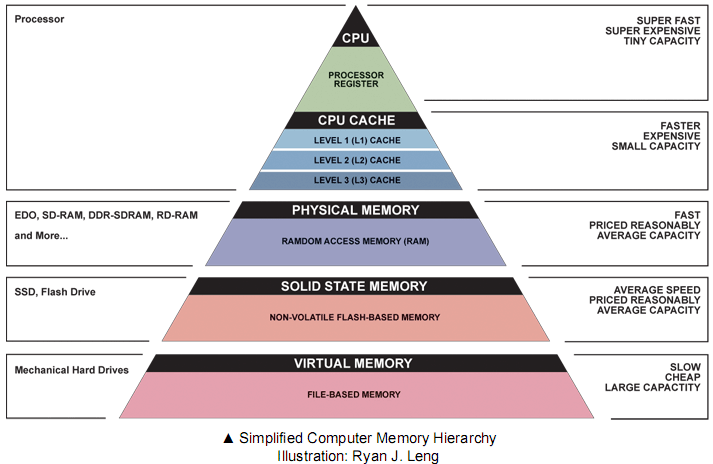
   The function and purpose of memory within a computer, games console or even a mobile device is to store and archive information and data packets which the CPU will then be able to access and process at a later time. This is a useful process as it enables a much faster access of the information required by both the user and the CPU. If you did not have memory the CPU would have to search all over the many storage devices and locations to collect and find the information it required which would result in extremely long times. But, with memory the computer is able to store it within a temporary easily accessible place for the CPU to locate. The processor access this memory whenever required by the software in use and stores any repeatable or quickly required information within the memory. Below is a diagram showing the hierarchy of memory within a computer system.

(Ex. 1 - Computer Memory Hierarchy)
 Link for larger version - http://images.bit-tech.net/content_images/2007/11/the_secrets_of_pc_memory_part_1/hei.png

   Now memory is a very broad term for the specific hardware's used. There are in fact 3 various forms of memory.

1. RAM


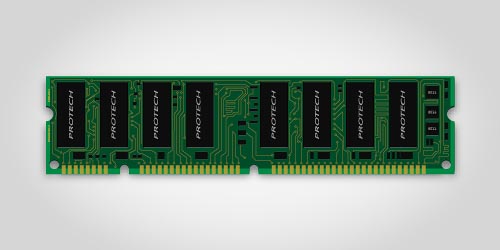
(Ex. 2 - A picture of a standard DDR3 RAM chip)


    Random Access Memory or RAM for short is a form of computer memory which allows access to it randomly. Now this may sound weird but in principle it means that the CPU is able to access any piece of information it requires at will without the need for a specific logical order or access. This allows for greater speed and versatility when it comes to accessing memory. This form of memory is the most commonplace and is also the default memory standard of both PC's and many Mobile devices. The size of it can also vary from the old standard of 256MB all the way up to the 312GB size of server farms of course the more common size for both games and commercial grade computers ranges from anywhere between 2GB - 32GB. The size of a RAM directly relates to it's core function which is the ability to store temporary information for the CPU to access. Obviously then the more space a RAM has the more data it is able to hold and thus the CPU is faster and more efficient in it's tasks. Finally the last notable point to mention about RAM is that it's core selling point is that it stores a temporary amount of memory. This means that if the computer is switched off or power to the RAM or CPU get cut all the data which was stored within it is lost. Although i have reffered to the standard of memory as RAM there are in fact 3 variations of RAM which are used within computer, console, mobile systems etc. Two of which are the main ones in use and often your computer will utilize both of the following two at the same time but, for different reasons due to the pro's and cons of each. These are:

1.1 DRAM

   DRAM also known as Dynamic Random Access Memory is a form of RAM which stores data in different way. The way data is stored within a memory chip is through the use of many millions or even billions of transistor's and capacitors a bit like a CPU and these all form together to create in theory a memory cell of electrical impulses. The computer will recognize the Boolean values of either 0 or 1 as the capacitors can either be charged or discharged or put simply they can either be on or off. This in turn means that the capacitors are capable of storing the information required whilst the transistors are able to allow the information to flow through and stay held within the memory. 

  The issue and the main difference between DRAM and SRAM is the way in which they store their memory DRAM will contain it's information within the capacitors but as even nonconducting transistors will always have a significantly small leak it means that the capacitors will only retain information for a period of time before having to be refreshed or charged frequently otherwise the information held would simply disappear. It is because of this reason that it is referred to as dynamic memory rather than static. It is also a volatile form of memory as it's information will be lost when it loses the necessary power.

  The reasons for this type of memory being in use is due to it being far more common and thereby meaning that there are more variations of it. Also it is far more cheaper than that of it's static counterpart. Although due to it's need to constantly refresh it is also slower and less capable than that of other static RAM types.


1.2 SRAM

   Static Random Access Memory or SRAM for short is another form of RAM management and storage which is entirely different from that of it's dynamic counterpart. Rather than relying upon many billions of transistors and capacitors it's approach is far more digital. It is a semiconductor form of memory which uses "bistable latching circuitry" to achieve it's storage of bit data. This is simply a circuit or memory cell which contains 4 - 8 transistors with soldered wiring. Due to its more advanced storage method it retains data Remanence which means that unlike Dynamic memory which needs to be refreshed static memory need never refresh. Although it is still a volatile form of memory as the information stored will be lost when their ceases to be power to the chip.

   The advantages of this type of memory have already been discussed such as that of it being faster and more reliable along with reducing the need for constant refreshes. But, it is not as widely used as it is far more expensive due to the way it is used and it also comes in smaller sizes for it's price. Although in many modern PC's many RAM chips especially that of DDR3 will usually utilize both SRAM and DRAM for various tasks.


Display


   Now that we have understood what memory is and how it functions. It is time then to move on to Displays.

   It is thanks to your display that you are able to see the amazing visuals of a video-game, watch the awesome epic of a movie or even just read this blog! A display a device or in some cases peripheral which enables the user to see an image or images. Within the early days display devices relied upon Catho Ray Tubes or CRT to create color and display an image upon the screen but as this blog is about modern technology i will be focusing exclusively on LCD screens as they are the most popular and most widely used form across all platforms.

   LCD or Liquid Crystal Display is a form of technology employed across almost all platforms and is by far the most common/popular form of display hardware on the market today. The way in which it work sis hinted by it's name. To create it's wide variety and range of colors it uses crystals which rotate and switch picture elements or "pixels" on or off which enable it to create a wide depth and range by forcing light from the back of the display device to the front. Each separate pixel much like within a CRT display contains three sub colors which are RGB or Red, Green and Blue. It is with these 3 various colors being mixed that enable the display to show such a range of colors. This range is capped at 16.7 million different color types as the combination of 3 separate colors with a fixed amount of 256 shades only allow 16.7 million different variations.

   The range of devices which LCD's cater for is wide and so then is their pixel resolution ability. Below is a short of list of devices and their pixel resolutions.

DSI - Top 256px - 357px bottom 256px - 357px

3DS - Top 400px - 240px bottom 320px - 240px

PS Vita - 960px - 544px

IPhone 5 - 640px - 1146px

Samsung Galaxy S5 - 1080px - 1920px

32 inch TV - 1920px - 1080px

Sound


   So, now that we understand Displays it is time to move onto the hardware which is responsible for Sound. First of all to keep things simple as audio hardware is vast encompassing area i will be referring only to PC sound-card hardware to explain my point so as to keep us on track and not to get confused by the various nuances of different hardware although much of the principles are the same.

  Within the early days of computing sound-cards were not existent and analogue was the supreme ruler in all audio affairs. Due to this PC's were completely incapable of producing or reproducing sound of any kind save for a simple sine wave beep which could be modulated, decayed and pitch tuned but it was extremely basic and didn't provide much in the way of audio fidelity in the time. Enter the sound-card and analogue audio conversion.

   Within every modern computer today is at least a basic sound-card plugged into a PCI/PCIE- slot which contains 4 sub components. These are:

ADC

  An Analog to Digital Converter is a small chip capable of processing analogue audio waves into a digital bit stream data signal which is readable and editable by the computer. An example would be this: Imagine you are using a microphone to sing into an DAW and you are recording your voice. The ADC will be converting the analogue signal of voice and turning it into a digital signal for the computer. The in which this process works is by taking the analogue audio and measuring the frequency ranges which it contains from Hz to Khz these are all taken at frequent intervals and are what is known as the sampling rate of a card.  By having a higher sample rate the computer is able to more accurately trace the frequency ranges of the signal and provide a cleaner conversion at the cost of more space. Currently the highest sampling rate available is 192 Khz 32 bit.

DAC

  The Digital Audio Converter or DAC is simply the ADC in reverse! Let's say you have recorded your song and finished it and you want to play it back for your friends to hear. When you press the play button the sound-card takes your digital signal and converts it back into an analogue signal which is then able to be played by the speakers of your headphones, monitors etc.

PCI

    The PCI or PCI-E port is simply the slot on your motherboard which the sound-card is plugged into for both the CPU and Hardware Abstraction Layer to communicate and translate with.

I/O

   This is simply the Input and Output connections of your sound-card for peripherals such as limiters, speakers, monitors, mixing desks etc.

Games Storage Mediums


   Now then it is time to move onto the final piece which is that of storage mediums for games and games hardware.

   Believe it or not storage mediums are still a new invention within the hardware world having only made a commercial debut onto the market just over 3 decades ago and consoles have only managed to embrace fully as of 2 decades ago. So they are still new inventions and thus innovation and advancements are happening all of the time within this sector with many new failed and successful technologies being created. Within this final section of the blog i will be detailing 2 of the most important storage mediums in use today.

Flash Memory

    Flash memory is quickly increasing and extremely popular storage medium which is hitting the market today thanks to the advent of hardware such as SSD's and PS Vita's, Nintendo 3DS use of internal flash memory. Although hitting the market in the form of SD Cards within the late 90's and having been designed with portability in mind it is now capable of having storage sizes of up to 4TB in the case of SSD's as well as up to 128GB in the case of Internal and SD card space sizes. It's significant advantage is it's reliability and speed which is unparallelled within the storage sector although due to it's extremely new arrival onto the scene it is still a new experimental and expensive hardware which can cost anywhere from £250 for 750GB of storage space. It is extremely common amongst mobile and tablet devices.

Disc Based Storage

   Now due to the different technologies i have split disc based storage into 2 sections so as to help better understand the differences between the various capabilities of the technologies.

   HDD

      One of the original versions of disc based storage the HDD is one of the most common storage types in the market today coming bundled with almost any new PC, Console, Laptop etc. Due to it's low cost the amount of space you can buy for your money is incredible. But, unlike flash there are many moving parts and thus the potential for failure is high, They are also slower than that of their flash based counterparts due to the reliance of moving mechanical parts and it's dynamic nature.

   CD/DVD/Blu-Ray

      Following on from HDD's are fully disc based storage mediums. These type storage medium have been around since CD's and Floppy drives. They have also proven extremely popular amongst the entertainment media industry especially that of the games industry. Originally they made their debut for consoles and PC' s back in 1995 but, they could only hold 700MB of data at the time and were writable only once. This was a brilliant method of stopping piracy which began during this time. Now though we have had many advancements in disc based storage mediums and we now have various forms of discs on offer. Up until this year DVD has been a prominent figure which was capable of 4.7GB of data per disc and they are both readable and writable. But, since 2007 a new disc format has become champion known as Blu-Ray. Developed and cocnepted by a joint venture of Sony and PHilips this disc format is capable of holding at least 12.4GB of data all the way up to a whopping 34.5GB of data per disc. It is also dual layered and therefore is not as destructible or volatile as that of the DVD. It's downfall however is it's read speed the speed of a blu-ray disc spins slower than that of DVD and so in many cases data must be installed from the disc to help speed load times. Nevertheless it has quickly cemented it's place on the market and is now the default technology of both the Xbox One and PS4 consoles.